PH
PHjaymich2016
Honorary Poster
guys patulong ako paanu gumawa ng config sa ovpn sa ios ko  madami na akung ginawa peru 302 lumalabas sana may mag turo sakin
madami na akung ginawa peru 302 lumalabas sana may mag turo sakin madami na akung ginawa peru 302 lumalabas sana may mag turo sakin Pa pm po working payload sa kickstart smart bro ..change payload po pag status code 302
Pa pm po working payload sa kickstart smart bro ..change payload po pag status code 302
ayaw gumana dito sa ovpn yung mga payload sa injector ehSa tcpvpn po .. Europe tapos uk server ... Gumagana po ba sa uk?pwede yun, san ka ba nagawa ng account saka ovpn?
Donesgdo nalang mabilisregister ka sa sgdo 24 upload ku yung file tapos turuan kita magedit
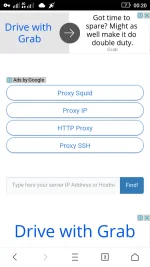
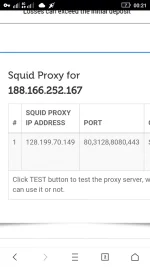
tapos anu sunod ?saan ko po makikita ang sgdo24 ?kunin mo yung ip ng sgdo24 , then punta ka sa squidproxy.org then paste mu yung ip dun sa box then tap mu yung find
yung file na attached ku yunSaan
saan ko po makikita ang sgdo24 ?
Ah .. Tapos kung makuha yung nasa box anu sunod ? Sorry huh kung madami akung tanong .. Newbie pa ako sa ovpnyung file na attached ku yun
Ammf .. Yan lang idadag k0?pagkaopen mo nung .ovpn file eto gawin mo
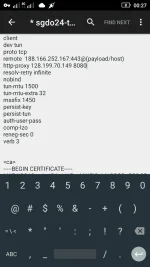
yung line na "remote188.166.252.167 443"
gawin mong
"remote 188.166.252.167:443@(payload/host)"
then natandaan mo yung nakuha mo sa squid proxy.org?
eto yun,
inser mo tong line na to after ng line ng remote
http-proxy 128.199.70.149 8080
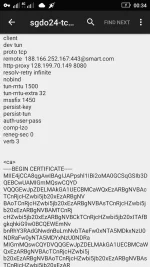
(see attached screenshot)
then save, at pwede mo na import yan,
opo ganun lang yun,Ammf .. Yan lang idadag k0?