 PH
PHDahil wala ako magawa, eto tutorial para sa mga newbies na gaya ko na umaasa sa mga TS na magpopost ng .prx. This is a no brainer tut but hope this will help you . Kung may nakapag post man pagpasensyahan na, sayang naman kung hindi ko to ipopost. Kung alam nyo na beri nays, pero target audience ko dito ay mga newbies. Hehe
How to download .prx
1. Search for any thread na may tag na .prx at maghanap kayo ng attachment nila na may .prx kung hindi nila shinare sa mismong body ng thread ang manual config
2. Download an app sa play store or app store that can read .prx (in my case since ios user ako, I downloaded document 6 app)
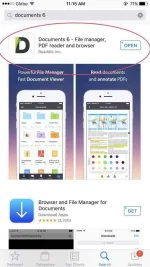
3. Go back to step 1 then hit download!
4. Eto lalabas kung IOS user kayo who uses document 6 app. Click more for more options
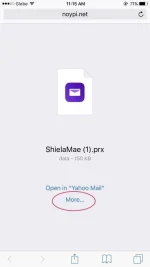
More..... then select the app you want to open the file
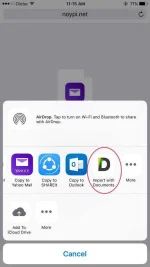
5. Automatic mag pop up ang .prx file in text format, eto itsura nya.
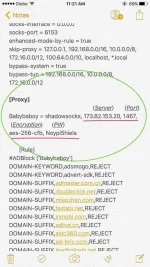
What you need to find manually sa .prx ay yung proxy, in this screenshot I already labelled kung ano itsura nya and put label sa:
Server, Port, Encyption, Password - ganyan ang format nya.
6. Go to your SS client app ( waterdrop, wingy, brook, postern, etc.,) then manually import the details sa configuration nyo then CONNECT!!
Hope this helps! Isang like lang at comment para naman sa effort ko. Hahahaha!
-Chadbugger
How to download .prx
1. Search for any thread na may tag na .prx at maghanap kayo ng attachment nila na may .prx kung hindi nila shinare sa mismong body ng thread ang manual config
2. Download an app sa play store or app store that can read .prx (in my case since ios user ako, I downloaded document 6 app)
3. Go back to step 1 then hit download!
4. Eto lalabas kung IOS user kayo who uses document 6 app. Click more for more options
More..... then select the app you want to open the file
5. Automatic mag pop up ang .prx file in text format, eto itsura nya.
What you need to find manually sa .prx ay yung proxy, in this screenshot I already labelled kung ano itsura nya and put label sa:
Server, Port, Encyption, Password - ganyan ang format nya.
6. Go to your SS client app ( waterdrop, wingy, brook, postern, etc.,) then manually import the details sa configuration nyo then CONNECT!!
Hope this helps! Isang like lang at comment para naman sa effort ko. Hahahaha!
-Chadbugger