 PH
PHKatropa No Load tayo ngayon for PC.
No Block, No Cap, No Load.
All open any site. (Kissanime and K-Dramas "Use Japan Server")
Step 1: Download Psiphon 3 and put it in the DESKTOP
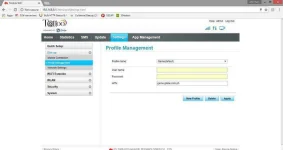
Step 2: Access your Pocket Wi-fi Dashboard
Create Profile APN
(Browsing Set UP)
Name:freenet.ph
APN:freenet.ph
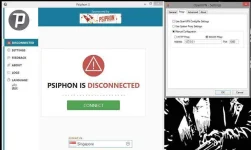
Step 3: Run the Psiphon 3 as ADMINISTRATOR
Connect to fastest Country.
or Direct Singapore
Step 4: Check the settings of your Browser.
Make sure you check All the Settings in Proxy Servers.
Use a proxy and Bypass
Official LINK:
You do not have permission to view the full content of this post. Log in or register now.
Psiphon 3 LINK:
You do not have permission to view the full content of this post. Log in or register now.
Guide and Tutorial are in the Pictures.
Summary:
-Note: Run All Programs to Administator
-Run Steam in Normal way or as administrator. SOMETIMES Steam won't connect if run as Administrator. So try Until magconnect.
*Change APN to GamingAPN
*Change DNS to Singapore Based DNS
*Set Psiphon 3 Socks to 1080 and Check Disable Timeout
*Set OPNVPN Proxy Settings to Socks 127.0.0.1 Port 1080
========================
tcpvpn acct removed (XD)
OK use XSGGS TCPVPN ACCOUNT for guaranteed Low Ping.
Link:
You do not have permission to view the full content of this post. Log in or register now.
=========================
Gaming APN:
Name: GamingI
APN: http.globemy-games.com.ph
Name: GamingII
APN: game.globe.com.ph
=========================
DNS (Speed:Location Matters)
Singapore: Recommended
203.116.1.78 - Starhub DNS
203.116.254.150 - Starhub DNS
203.116.1.94 - Starhub DNS
202.156.1.48 - Starhub DNS
Globe:
202.52.163.6 - Globe DNS
202.52.163.7 - Globe DNS
=================================
Bonus: Smart Users Only
1AM-6AM 1GIG (Sulit sa Dota2)
Just text GN15 send to 9999
=================================
ImageI: Changing APN
ImageII: Changing OPENVPN Settings
ImageIII: Setting UP Psiphon 3
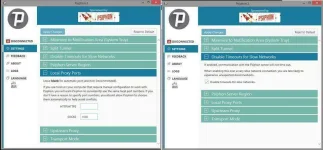
Image IV: Changing DNS
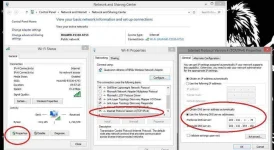
Image V: Proof of Connecting.
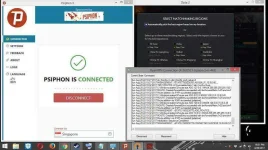
Note: Na post ko na sa FB Group kung saan ADMIN ako. At gustong kung eshare to dito. Kaya kung bawal ang COPY PASTE dito na ng galing sa FB. Pakibura nalang.
PROOF:
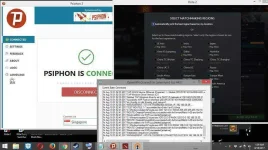

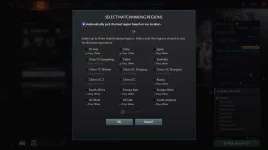
Proof of NO BLOCK AND NO CAP
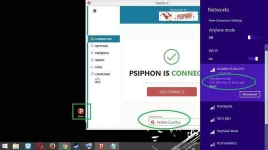
Like and Follow for more Updates.
No Block, No Cap, No Load.
All open any site. (Kissanime and K-Dramas "Use Japan Server")
Step 1: Download Psiphon 3 and put it in the DESKTOP
Step 2: Access your Pocket Wi-fi Dashboard
Create Profile APN
(Browsing Set UP)
Name:freenet.ph
APN:freenet.ph
Step 3: Run the Psiphon 3 as ADMINISTRATOR
Connect to fastest Country.
or Direct Singapore
Step 4: Check the settings of your Browser.
Make sure you check All the Settings in Proxy Servers.
Use a proxy and Bypass
Official LINK:
You do not have permission to view the full content of this post. Log in or register now.
Psiphon 3 LINK:
You do not have permission to view the full content of this post. Log in or register now.
Guide and Tutorial are in the Pictures.
Summary:
-Note: Run All Programs to Administator
-Run Steam in Normal way or as administrator. SOMETIMES Steam won't connect if run as Administrator. So try Until magconnect.
*Change APN to GamingAPN
*Change DNS to Singapore Based DNS
*Set Psiphon 3 Socks to 1080 and Check Disable Timeout
*Set OPNVPN Proxy Settings to Socks 127.0.0.1 Port 1080
========================
tcpvpn acct removed (XD)
OK use XSGGS TCPVPN ACCOUNT for guaranteed Low Ping.
Link:
You do not have permission to view the full content of this post. Log in or register now.
=========================
Gaming APN:
Name: GamingI
APN: http.globemy-games.com.ph
Name: GamingII
APN: game.globe.com.ph
=========================
DNS (Speed:Location Matters)
Singapore: Recommended
203.116.1.78 - Starhub DNS
203.116.254.150 - Starhub DNS
203.116.1.94 - Starhub DNS
202.156.1.48 - Starhub DNS
Globe:
202.52.163.6 - Globe DNS
202.52.163.7 - Globe DNS
=================================
Bonus: Smart Users Only
1AM-6AM 1GIG (Sulit sa Dota2)
Just text GN15 send to 9999
=================================
ImageI: Changing APN
ImageII: Changing OPENVPN Settings
ImageIII: Setting UP Psiphon 3
Image IV: Changing DNS
Image V: Proof of Connecting.
Note: Na post ko na sa FB Group kung saan ADMIN ako. At gustong kung eshare to dito. Kaya kung bawal ang COPY PASTE dito na ng galing sa FB. Pakibura nalang.
PROOF:
Proof of NO BLOCK AND NO CAP
Like and Follow for more Updates.