 PH
PHPara sa mga mahilig sa mga PC Games ay magsaya na kayo
dahil ikatutuwa nyo ito kasi may Tap Adapter na ito...
SSTap vpn for shadows download link below:
pili lang..
You do not have permission to view the full content of this post. Log in or register now.
You do not have permission to view the full content of this post. Log in or register now.
You do not have permission to view the full content of this post. Log in or register now.
You do not have permission to view the full content of this post. Log in or register now.
You do not have permission to view the full content of this post. Log in or register now.
You do not have permission to view the full content of this post. Log in or register now.
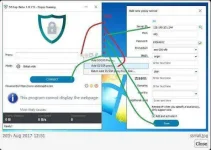
how it works:
1. download and install SSTap
2. open SSTap on your desktop
3. click + button
4. click Add SS/SSR Proxy
4. input the Updated SS Account Below
5. check the Add and Activate it
6. Click Save
7. Click Connect And Wait Until Connected
8. Enjoy Playing Online Games or Downloading
Note.. if mabagal po sa inyo., try cdc lang..
if mabagal parin try mo yung ibang ss account na seneshare dito.
kasi tyak na pagpyestahan ang account na nandidito sa first page.. yun lang po.. good luck mga papy...
working shadowsocks account below:
account1
ip- 192.241.229.212
Port:443
Password: 85158174
Method:chacha20
account2
ip- 128.199.201.244
Port:443
Password: 83664652
Method:aes-256-cfb
dahil ikatutuwa nyo ito kasi may Tap Adapter na ito...
SSTap vpn for shadows download link below:
pili lang..
You do not have permission to view the full content of this post. Log in or register now.
You do not have permission to view the full content of this post. Log in or register now.
You do not have permission to view the full content of this post. Log in or register now.
You do not have permission to view the full content of this post. Log in or register now.
You do not have permission to view the full content of this post. Log in or register now.
You do not have permission to view the full content of this post. Log in or register now.
how it works:
1. download and install SSTap
2. open SSTap on your desktop
3. click + button
4. click Add SS/SSR Proxy
4. input the Updated SS Account Below
5. check the Add and Activate it
6. Click Save
7. Click Connect And Wait Until Connected
8. Enjoy Playing Online Games or Downloading
Note.. if mabagal po sa inyo., try cdc lang..
if mabagal parin try mo yung ibang ss account na seneshare dito.
kasi tyak na pagpyestahan ang account na nandidito sa first page.. yun lang po.. good luck mga papy...
working shadowsocks account below:
account1
ip- 192.241.229.212
Port:443
Password: 85158174
Method:chacha20
account2
ip- 128.199.201.244
Port:443
Password: 83664652
Method:aes-256-cfb
