PH
PHGoodafternoon guys,
Im here again to give you some information on how to create Softether account (Load Required) In easy way without no hussle. (With StepByStep Picture)
Sorry for some days without no tutorials. Busy na ulet sa trabaho ang kuya Keera eeh.
Requirements:
PC/Laptop,
Internet Connections.
account,
Follow my Lead,
Step 1
Create account to any Website that support Softether account server.
I choose
Nilagyan ko ng asterisk yung extension, alamin nyo nalang kung ano yung Dapat ilagay dun. 
Step II
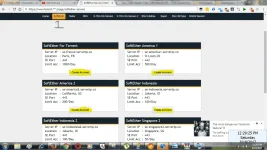
Pili na lang kayo ng account..
Then i choose France Server.
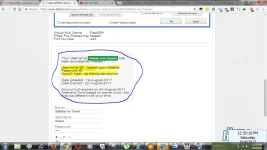
Done. Nakagawa na tayo ng account para sa ating softether.
Step III
Now, How to apply your account to your Softether?
Follow this:
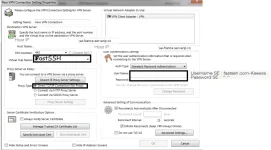
Use Connect via HTTP Proxy Server to your Proxy Server as Relay:
The Tick [Proxy Server Setting]
hostname: 127.0.0.1
Port: 25378
So that's it.
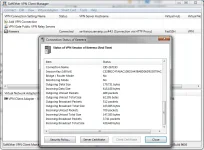
Open for for all account:.
Enjoy.
Simple Like is my Happiness to Post more tutorial about your Everyday Life.
Follow my Simple Tutorial Thread about SScap and Softether.
Im here again to give you some information on how to create Softether account (Load Required) In easy way without no hussle. (With StepByStep Picture)
Sorry for some days without no tutorials. Busy na ulet sa trabaho ang kuya Keera eeh.
This tutorial is made by me:Disclaimer:
Spoiler contents are visible only to Established Members.
Requirements:
PC/Laptop,
Internet Connections.
account,
Follow my Lead,
Step 1
Create account to any Website that support Softether account server.
I choose
Spoiler contents are visible only to Established Members.
Step II
Pili na lang kayo ng account..
Then i choose France Server.
Done. Nakagawa na tayo ng account para sa ating softether.
Step III
Now, How to apply your account to your Softether?
Follow this:
So if you are using SScap.Optional
Use Connect via HTTP Proxy Server to your Proxy Server as Relay:
The Tick [Proxy Server Setting]
hostname: 127.0.0.1
Port: 25378
So that's it.
Open for for all account:.
You do not have permission to view the full content of this post. Log in or register now.
Enjoy.
Simple Like is my Happiness to Post more tutorial about your Everyday Life.
Follow my Simple Tutorial Thread about SScap and Softether.