 PH
PHApps Needed:
Es File Explorer Pro You do not have permission to view the full content of this post. Log in or register now.
[Any File Manager would do]
Steps:
1.Open/Launch Es File Manager then enable Root Explorer on the Left Tab.
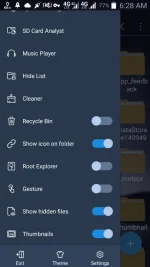
2.Click the upper Left Tab then click Device
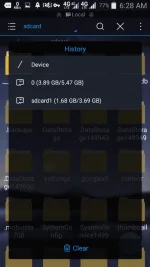
3.Go to Data>Data>com.android.browser>Databases>
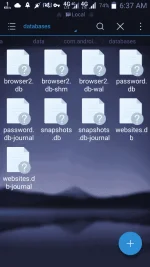
4.Click/Tap password.db-journal
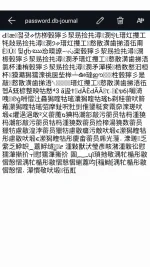
5.If you have a China Phone just Click/Tap Encoding then select ISO-8859-(any number) then there you go!
Like at Feedback lang Okay na!
Es File Explorer Pro You do not have permission to view the full content of this post. Log in or register now.
[Any File Manager would do]
Steps:
1.Open/Launch Es File Manager then enable Root Explorer on the Left Tab.
2.Click the upper Left Tab then click Device
3.Go to Data>Data>com.android.browser>Databases>
4.Click/Tap password.db-journal
5.If you have a China Phone just Click/Tap Encoding then select ISO-8859-(any number) then there you go!
Like at Feedback lang Okay na!