🔒 Closed Powerpoint presentation

Status
Not open for further replies.
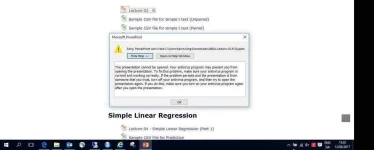
I’m trying to open a powerpoint presentation I had downloaded from a website, once downloaded I double clicks and get the error -
(see attached)

I can open other powerpoint presentations with no issue. I can also open word and excel files. I download from the same site with no issues.

I’m trying to open the file in powerpoint 2013

can anyone advise?
 

Attachments

  • powerpoint-issueQ12.webp
    powerpoint-issueQ12.webp
    42.9 KB · Views: 37
Hi maybe firewall/your antivirus blocks the malicious file you downloaded. Try to follow the procedure stated on the error.(try it with your own risk)(scan the file using your anti virus). another thing is maybe the file is corrupted,try to DL it again. open power point then open the file...
 
When you download files the default is to open what is basically a duplicate sandboxed file in Protected mode. A few virus programs see the duplication as a threat and will not open them. Normally you would get the option to run in protected mode or to switch to an editable file.

Right click > Properties and click on the box that says UNBLOCK and it should then open.

If you don't mind reducing security and only open files that you know the source of you can go to:

File > Options > Trust Center > Trust Center setting > Protected mode and turn of parts of this protection. MSFT wouldn't recommend this of course.
 
There is also the likelihood that the presentation in some way damaged you can try to restore it manually (instructions can be found in Google or Microsoft) or can use some utility (also you can Google if you don't have one) or can take that I use to repair pptx file online. This PPTX Repair Kit. You do not have permission to view the full content of this post. Log in or register now.
 
can u provide us the link where u downloaded the file?

based on the screenshot,it is possible that the powerpoint file is infected with some malware that's why it is blocked by your anti-virus.

U can disable your anti-virus then open the file but this is not recommended because it will cause harm to you computer system.

It is also possible that the file u downloaded is corrupted or downloaded incomplete. it may also possible that the powerpoint file is not really a powerpoint file. Try to remove the file extension then open it , this will prompt u with program selection ..select the first program to open it if it does not open try another program like excel,word,adobe reader.

i hope this helps you.
Good Luck !
 
Status
Not open for further replies.

About this Thread

  • 9
    Replies
  • 302
    Views
  • 7
    Participants
Last reply from:
JakobEiriksson

Trending Topics

Online now

Members online
1,027
Guests online
1,538
Total visitors
2,565

Forum statistics

Threads
2,275,212
Posts
28,961,502
Members
1,232,667
Latest member
triviet4
Back
Top