PH
PHHalos lahat sa atin siguro eh... iki-click talaga yun USB icon na nasa lower right side ng atin monitor para mabunot ang atin USB HDD. Dahil minsan sa atin buhay ay may nakapagsabi na sa atin ng, "Masisira yan, right click mo muna dyan para ma-eject ng maayos.". Kaya kahit gaano na tayo nagmamadali, hihintayin talaga natin na lumabas ang "Safe to Remove Hardware".
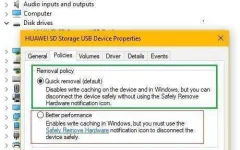
Pero ang default setting pala sa Windows Device Manager ng USB Storage ay "Quick Removal" (See attached pic or go to your Windows machine... Right click on "My Computer" then choose "Properties" or hit the Windows key + Pause/Break key on the keyboard; System properties will open. Go to Device Manager, click the drop down button for Disk drives and you should see the USB disk drive(s) and other hard drives that are connected... Right click on a USB Device and click Properties, then go to "Policies" tab at makikita nyo na din ang pinaglalaban ko ) Kaya para sa akin, okay lang na bunutin na agad ang device basta naka-close na yun mga files, data or applications na naka-save o konektado sa atin USB drives. Laking ginhawa din na hindi na kelangan pang magki-click at maghintay; pag tapos na copying, bunot then Go.
Syempre po nasa inyo na din kung anong way ang gagawin nyo. February of this year ko lang napansin yun default setting dahil sa anak ko na bunot lang ng bunot pag ililipat sa ibang kompyuter ang aming USB HDD, at simula nun, bunot na lang din ako ng bunot... So far, wala pa naman nasisira or na-corrupt sa mga USB drives namin.
Sana kahit pano eh may natutunan kayo sa una kong thread. Na-obliga ako mag-share, to give back sa mga natutunan ko sa mga mababait at malulupit na members ng PHC. Yun nasa likod ng PHCorner... APIR sa inyo at mabuhay kayong lahat.
Pero ang default setting pala sa Windows Device Manager ng USB Storage ay "Quick Removal" (See attached pic or go to your Windows machine... Right click on "My Computer" then choose "Properties" or hit the Windows key + Pause/Break key on the keyboard; System properties will open. Go to Device Manager, click the drop down button for Disk drives and you should see the USB disk drive(s) and other hard drives that are connected... Right click on a USB Device and click Properties, then go to "Policies" tab at makikita nyo na din ang pinaglalaban ko
) Kaya para sa akin, okay lang na bunutin na agad ang device basta naka-close na yun mga files, data or applications na naka-save o konektado sa atin USB drives. Laking ginhawa din na hindi na kelangan pang magki-click at maghintay; pag tapos na copying, bunot then Go. Syempre po nasa inyo na din kung anong way ang gagawin nyo. February of this year ko lang napansin yun default setting dahil sa anak ko na bunot lang ng bunot pag ililipat sa ibang kompyuter ang aming USB HDD, at simula nun, bunot na lang din ako ng bunot... So far, wala pa naman nasisira or na-corrupt sa mga USB drives namin.
Sana kahit pano eh may natutunan kayo sa una kong thread. Na-obliga ako mag-share, to give back sa mga natutunan ko sa mga mababait at malulupit na members ng PHC. Yun nasa likod ng PHCorner... APIR
sa inyo at mabuhay kayong lahat.