 PH
PHS H I N I G A M E
Forum Guru
Tulong po mga paps
Hindi kasi ako makapag update ng os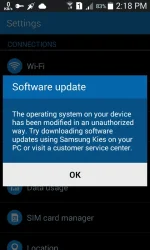
Yan po lumalabas
Hindi kasi ako makapag update ng os
Yan po lumalabas
baka naka root phone mo?
Na unroot ko napo peru ganon parin ayaw nyaflash mo ulit sa stock rom..or kung rooted ka try mo e unroot then update mo ulit
then flash mo ulit sa stock romNa unroot ko napo peru ganon parin ayaw nya
Dpo kasi ako marunong mag flashthen flash mo ulit sa stock rom
Dkopo kasi alam kung paano mag reflashayaw pa rin yan kasi namodified na yung system dahil sa root. ganyan din nangyari sa phone ko samsung din. Ang solution dyan reflash or hayaan mo nalang.
hanap ka sa y outube maraming tutorialsDpo kasi ako marunong mag flash
Cge po maraming salamathanap ka sa y outube maraming tutorials
Ty poBelow are the steps I had to do to get the phone back to a condition where OTA updates are again functional:
Un-mounted the inserted SD card.
Restart the device.
Go to Android recovery mode by pressing the Power + Volume down button.
Select the "Wipe cache partition".
Restart the device after successful wipe.
Continue the normal steps for OTA android update.
After the above steps, I was able to successfully solve the problem and update my device. I re-inserted the SDcard, but did not face the error again.
Hope it help.
Na unroot konapo pero ayaw pRinUnroot first then update again