 PH
PHThis tut is for those who know how to set up their Http Proxy Injector and just want to download torrent and update some of their desktop applications.
- First, dapat connected na yung Http Proxy Injector nyo.
- Download Softher VPN here: download and install "You do not have permission to view the full content of this post. Log in or register now."
- Once installed open the application then follow this steps:
Gawa kanyu ng new Virtual adapter, for some reason ayaw sakin gumana ng default yun din siguro nagiging problema ng iba:
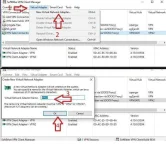
- Kahit anung Adapter name then set up nyu yung proxy:
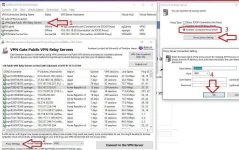
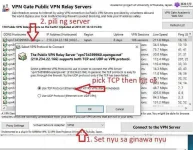
- Pag ka set ng proxy, connect sa kahit nung public server na supported ang UDP (halos lahat naman ng server jan supported) gamit yung gawa nyung Virtual Network Adapter
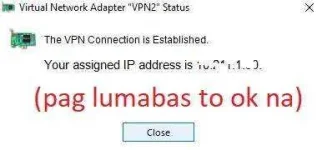
Yan, open nyu na torrent nyu Credits to sir
ondeste

- First, dapat connected na yung Http Proxy Injector nyo.
- Download Softher VPN here: download and install "You do not have permission to view the full content of this post. Log in or register now."
- Once installed open the application then follow this steps:
Gawa kanyu ng new Virtual adapter, for some reason ayaw sakin gumana ng default yun din siguro nagiging problema ng iba:
- Kahit anung Adapter name then set up nyu yung proxy:
- Pag ka set ng proxy, connect sa kahit nung public server na supported ang UDP (halos lahat naman ng server jan supported) gamit yung gawa nyung Virtual Network Adapter
Yan, open nyu na torrent nyu
Credits to sirondeste