 PH
PHDora The Explorer
Forum Guru
Tutorial showing how to login to Google+ on Modded Games:
Prerequisites (Things required in order for this to work):
- Rooted Phone/Emulator
- Lucky Patcher
- Busy Box (Needed for some functions on Lucky patcher)
- Unsigned Mod APK of the game you are trying to connect to Google+
Note: If you do not have unsigned Mod APK of the game, You can make it by following this tutorial Here:
You do not have permission to view the full content of this post. Log in or register now.
Installation Steps:
1) Open Lucky Patcher and click on toolbox as shown in the figure:
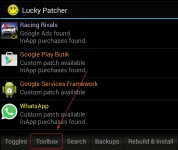
2) After that click on ρá†ch to Android button as shown in the figure:
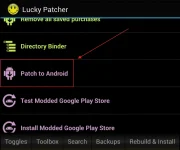
3) A new menu will open as soon as you click on ρá†ch to android. Tick the 'Signature Verification status
always true' and 'Disable .apk Signature Verfication' and click on Apply. It will take some time to ρá†ch,
till then do not click on anything.
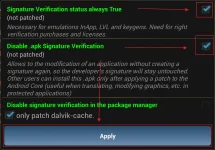
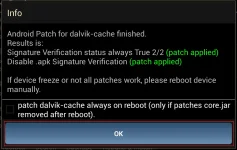
4) Once the ρá†ch is finished you will see a message as shown in the figure. Close Lucky Patcher and Reboot your device.
Note:
Some devices may not show this message but instead just restart the device, Make sure to check Lucky Patcher to see if the says ρá†ch Applied or not just below the patches
5) After your phone restarts, open Lucky Patcher again and Go to Toolbox---->ρá†ch to Android again as shown in earlier steps.
6) Tick on the option 'Disable signature verification in the package manager' and click on Apply. Wait for it to complete the process. After the Process is completed, close Lucky Patcher and Reboot your device.
Note:
On Some devices after the ρá†ch is applied the phone will Reboot automatically. No need to Restart again if the phone Restarted automatically.
7) After the patches are applied, uninstall the modded game for which you are trying to connect to Google+
8) Install the Playstore version of the game that you are trying to connect to Google+, Once the Game is installed login to Google+
9) Get the unsigned mod APK of the modded game and install it (the game will automatically be installed over the Playstore version) Make sure you do not uninstall the Playstore version as it is very important.
10) It is done when you open the game now it will already be connected to Google+.
Text tutorial explaining how to login to Facebook with Modded Games:
1. Disable/uninstall Facebook app.
2. Launch the game that requires Facebook login to play.
3. You will be redirect to a browser login for Facebook.
4. Input your credentials.
5. Voila! You're set and ready to go.
Note: No root is required for this.
P.S: I have tried to go in as much detail as I can, If you still don't understand it, oh well!
Prerequisites (Things required in order for this to work):
- Rooted Phone/Emulator
- Lucky Patcher
- Busy Box (Needed for some functions on Lucky patcher)
- Unsigned Mod APK of the game you are trying to connect to Google+
Note: If you do not have unsigned Mod APK of the game, You can make it by following this tutorial Here:
You do not have permission to view the full content of this post. Log in or register now.
Installation Steps:
1) Open Lucky Patcher and click on toolbox as shown in the figure:
2) After that click on ρá†ch to Android button as shown in the figure:
3) A new menu will open as soon as you click on ρá†ch to android. Tick the 'Signature Verification status
always true' and 'Disable .apk Signature Verfication' and click on Apply. It will take some time to ρá†ch,
till then do not click on anything.
4) Once the ρá†ch is finished you will see a message as shown in the figure. Close Lucky Patcher and Reboot your device.
Note:
Some devices may not show this message but instead just restart the device, Make sure to check Lucky Patcher to see if the says ρá†ch Applied or not just below the patches
5) After your phone restarts, open Lucky Patcher again and Go to Toolbox---->ρá†ch to Android again as shown in earlier steps.
6) Tick on the option 'Disable signature verification in the package manager' and click on Apply. Wait for it to complete the process. After the Process is completed, close Lucky Patcher and Reboot your device.
Note:
On Some devices after the ρá†ch is applied the phone will Reboot automatically. No need to Restart again if the phone Restarted automatically.
7) After the patches are applied, uninstall the modded game for which you are trying to connect to Google+
8) Install the Playstore version of the game that you are trying to connect to Google+, Once the Game is installed login to Google+
9) Get the unsigned mod APK of the modded game and install it (the game will automatically be installed over the Playstore version) Make sure you do not uninstall the Playstore version as it is very important.
10) It is done when you open the game now it will already be connected to Google+.
Text tutorial explaining how to login to Facebook with Modded Games:
1. Disable/uninstall Facebook app.
2. Launch the game that requires Facebook login to play.
3. You will be redirect to a browser login for Facebook.
4. Input your credentials.
5. Voila! You're set and ready to go.
Note: No root is required for this.
P.S: I have tried to go in as much detail as I can, If you still don't understand it, oh well!