hanap ka tutorial cmd. . . or pag ayaw parin, ehagis mo at bili ka nalang bago. mayaman ka naman dba? so bat ka ba mgpapagod jan. . .heheheHaha how po? Hihi
Sarcastic? Well, thank you for your effort. God bless you.hanap ka tutorial cmd. . . or pag ayaw parin, ehagis mo at bili ka nalang bago. mayaman ka naman dba? so bat ka ba mgpapagod jan. . .hehehe
Try ko po later. Thankstry mo mg install ng ccleaner tapos don mo e uninstall ang app na gusto mo e uninstall...
hehe kaso hindi po ako marunong mag back up hahahahahaha and hindi ko alam kung nabacak up po siya huhumeron namn system restore kailan mo ininstall yung program nandun yunbumalik ka sa petsa kung san di mo pa sya naistall. try mo system restore
system restore po di back up punta ka sa
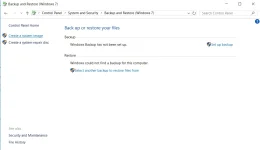
control panel
all controll panel list
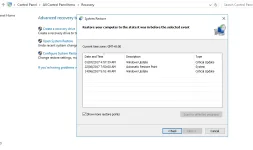
recovery
open system restore
yan po kasi gusto kong matutunan dati po kaso nakalimutan ko magrereset na naman po ako nyan mawawala na naman mg apps ko huhu thanks ha.

thanks po!
- Log on to your computer as an administrator.
- Open the Control Panel by clicking Start, and then clicking Control Panel.
- Click System and Security, and then click System.
- Under the Control Panel Home menu, click System protection.
If you are prompted for an administrator password, type your password. If you are asked for confirmation, provide confirmation.
- Click System Restore.
- Recommended Restore is the default choice. This restore is the most recent restore point and the best place to start.
- To choose a different restore point, click Choose a different restore point, click Next and then click a restore point.
- Click Next, and then click Finish to confirm your restore point.
- To start the restore process, click Yes.
- Once the system restore is complete, your computer will restart.
more power and God bless you po!hehehe sinuggest po sa akin yun nung ka-pch contributor po natin yun kuya hehe kaya ok po siguro yun hihirevo unistaller mas ok ts
malware kasi yang iorbit uninstaller. wag po basta basta kumuha ng apss sa mga di kilala
kung di ka sure sa apps mo total virus online check mo muna bago install
two years ago kuya heheYou do not have permission to view the full content of this post. Log in or register now.
ito yung scan sa kanya
fixed na po siguro now hehe mas pinaganda na nila hihioo nasira hard drive ko dyan sa product nila lalo yung iorbit driver booster. nagkanda sira sira yung mga files ko matagal ko din naayos kasi nagkabadsectro na sa kakaupdate ko ng driver na binibigay nila. base on experience yan
ng iba at syempre sakin