PH
PHStep 1. Register to SCHOOL promo. Text SCHOOL to 5555 (P5/day). Pwede mag-register ng maraming beses sa isang araw.
Step 2. Register an account. The server being mentioned in this tut is for testing purposes only. Pwede ang settings sa lahat ng region.
1. Goto You do not have permission to view the full content of this post. Log in or register now.
2. Select in America
3. Select "USA-MCT-TOP" with ServerIP "usa-mct-top.tcpvpn.com".
4. Click "Create Username and Password".
5. Download Premium VPNConfig (ovpn).
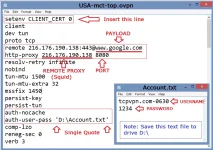
6. Edit the ovpn config (refer to the attached picture).
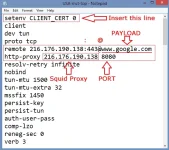
This is the Payload Generator settings for HTTP Injector for Android and PC:

NOTE:
-Sa extra T2 (twitter) promo ng TNT, palitan lang ang Payload ng You do not have permission to view the full content of this post. Log in or register now.
-Sa TM/Globe, pareho ang Payload na You do not have permission to view the full content of this post. Log in or register now.
Download ready-made ovpn and ehi configs here valid for TM and SCHOOL promo https://phcorner.org/t/new-superfast-ehi-ovpn-for-all-networks.328466/#post-4636336
Step 2. Register an account. The server being mentioned in this tut is for testing purposes only. Pwede ang settings sa lahat ng region.
1. Goto You do not have permission to view the full content of this post. Log in or register now.
2. Select in America
3. Select "USA-MCT-TOP" with ServerIP "usa-mct-top.tcpvpn.com".
4. Click "Create Username and Password".
5. Download Premium VPNConfig (ovpn).
6. Edit the ovpn config (refer to the attached picture).
This is the Payload Generator settings for HTTP Injector for Android and PC:
NOTE:
-Sa extra T2 (twitter) promo ng TNT, palitan lang ang Payload ng You do not have permission to view the full content of this post. Log in or register now.
-Sa TM/Globe, pareho ang Payload na You do not have permission to view the full content of this post. Log in or register now.
Download ready-made ovpn and ehi configs here valid for TM and SCHOOL promo https://phcorner.org/t/new-superfast-ehi-ovpn-for-all-networks.328466/#post-4636336