PH
PHacervergel87
Elite
StartIsBack 2.1.2 / StartIsBack+ 1.7.6 / StartIsBack++ 2.0.9

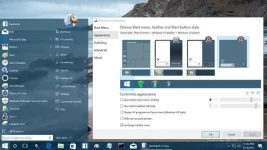
StartIsBack is a great way to relieve your (and your users) Windows 8 pain. StartIsBack returns Windows 8 a real fully featured start menu and start button, behaving exactly like the ones in Windows 7. StartIsBack radically improves desktop usability and makes new Start screen clutter-free. StartIsBack is fully native lightweight zero-privileges program, cheap and fair, fast, stable and secure. Boot to desktop; Original fully-featured Windows 7 start menu; Desktop and Modern interfaces clearly separated; Make Start screen clutter-free; Totally native; Rich customization and configuration; And More to come! Think of it as a transition path which Microsoft should have made for Windows 8. StartIsBack+ is the all-new version of StartIsBack for Windows 8.1. It's a FREE upgrade for all StartIsBack users. With Windows 10 StartIsBack++ is your pick.
screenshot
Changes in ++ 2.0.9:
Fixed Youdao Dictionary crashing StartIsBack on some systems
Instructions..
1. Install StartIsBack, obviously.
2. Use trial reset. Use manual reset every 29 days or install auto reset.
3. Enjoy!
Note: Pinned programs in Start Menu will be lost whenever you run trial reset.
------------------------------
-: Thanks/Credits :-
------------------------------
anuraag for making the trial reset script.
------------------------------
-: Important :-
------------------------------
IF YOU LIKE IT, AND CAN AFFORD IT, SUPPORT THE MAKERS AND BUY IT!
archive password:

StartIsBack is a great way to relieve your (and your users) Windows 8 pain. StartIsBack returns Windows 8 a real fully featured start menu and start button, behaving exactly like the ones in Windows 7. StartIsBack radically improves desktop usability and makes new Start screen clutter-free. StartIsBack is fully native lightweight zero-privileges program, cheap and fair, fast, stable and secure. Boot to desktop; Original fully-featured Windows 7 start menu; Desktop and Modern interfaces clearly separated; Make Start screen clutter-free; Totally native; Rich customization and configuration; And More to come! Think of it as a transition path which Microsoft should have made for Windows 8. StartIsBack+ is the all-new version of StartIsBack for Windows 8.1. It's a FREE upgrade for all StartIsBack users. With Windows 10 StartIsBack++ is your pick.
screenshot
Changes in ++ 2.0.9:
Fixed Youdao Dictionary crashing StartIsBack on some systems
Instructions..
1. Install StartIsBack, obviously.
2. Use trial reset. Use manual reset every 29 days or install auto reset.
3. Enjoy!
Note: Pinned programs in Start Menu will be lost whenever you run trial reset.
------------------------------
-: Thanks/Credits :-
------------------------------
anuraag for making the trial reset script.
------------------------------
-: Important :-
------------------------------
IF YOU LIKE IT, AND CAN AFFORD IT, SUPPORT THE MAKERS AND BUY IT!
archive password:
Spoiler contents are visible only to Established Members.