PH
PHDownload SSCap
Extract and Open SSCap
Configure SSCap
Configure Proxifier
Configure Google Chrome
Configure Mozilla FireFox
How to add Servers
Manual
QR Code
JSON
SS Link
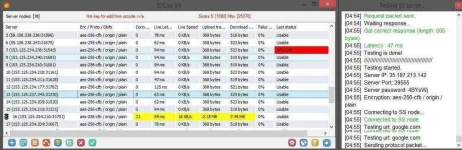
How to check if server/s is/are working
MAJOR NOTE:
Recently added servers from Account Created SS takes time to be build up.
It may turn up Unusable now but later on it will work
so PATIENCE, just repeat step 2. every 5 minutes or anytime you want
Personal Experience: I added 3 servers ended up not working, took 2 hours to turn up Usable and working.
Bonus Servers
- You do not have permission to view the full content of this post. Log in or register now.
- You do not have permission to view the full content of this post. Log in or register now.
- You do not have permission to view the full content of this post. Log in or register now.
- You do not have permission to view the full content of this post. Log in or register now.
- You do not have permission to view the full content of this post. Log in or register now.
Extract and Open SSCap
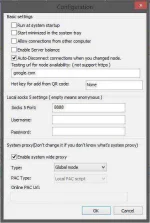
Configure SSCap
- On Lower-Right of SSCap, You can see a Gear Icon, Click it (Imitate the Screenshot below)

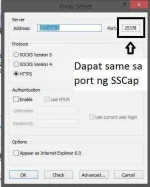
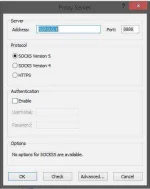
Configure Proxifier
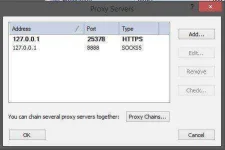
- Open Proxifier
- File > Load Profile > SSCap LadyClare
- Profile > Proxy Servers
- If walang laman, click add. (imitate ang dalawa sa screenshot below)
Configure Google Chrome
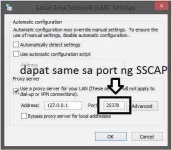
- On Google Chrome, Go to Settings (three dots on right side, scroll down, Settings)
- Advanced > System > Open Proxy Settings (a pop-up will emerge; Internet Properties)
- Click LAN Settings, Fill in the details (imitate the screenshot below)
- NOTE: Make Sure ang port ng SSCap ay same sa port na ilalagay niyo.

Configure Mozilla FireFox
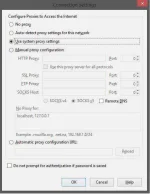
- Go to Options (3 dash lines on the right side)
- Advanced > Network > Connection > Settings (imitate the screenshot below)
How to add Servers

Manual
- Plug and chug (Server Address, Port, Password, Method, Remarks)
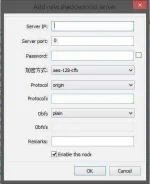
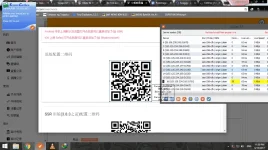
QR Code
- Scan QR Codes clicking on point to create a Scanning box (Quite Tricky if newbie)
- Usually found on Account created nodes
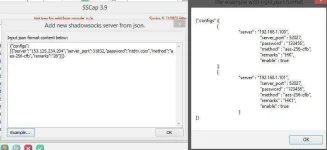
JSON
- Somewhat manual input pero intermediate level format na.
- Usually found on Account created nodes
SS Link
- Most Convenient
- Shorten config
- Can be decoded by using You do not have permission to view the full content of this post. Log in or register now.
- Usually found on Account created nodes

How to check if server/s is/are working
- Right Click Anywhere within the SSCap Window
- Click Check Selection Through TCP (for single node) or Check all SS nodes Through TCP (for all nodes)
- See the Last Status Tab, (Usable Means Working and Unusable Means Not Working)
MAJOR NOTE:
Recently added servers from Account Created SS takes time to be build up.
It may turn up Unusable now but later on it will work
so PATIENCE, just repeat step 2. every 5 minutes or anytime you want
Personal Experience: I added 3 servers ended up not working, took 2 hours to turn up Usable and working.
Bonus Servers
- You do not have permission to view the full content of this post. Log in or register now.