 PH
PHThe use:
Read and write external hard disk drives for phones and tablets with no NTFS support kahit OTG capable ang phone di nya ma view files, all you can do is format.
Requirements:
• OTG capable android phone or tablet (Rooted)
• OTG usb cable (supported socket ng phone mo)
• Hard Disk Dock (ginagamit ko with external adapter for power) or Hard Disk Usb Cable (feel free to test)
• Paragon USFD app
How to:
- Connect your hdd to your phone with otg cable.
- Pag naka connect na may lalabas sa notification na "Blank External USB storage, External USB storage is blank or has unsupported filesystem" pag click ang only option lang is Format.
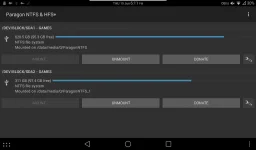
- Run Paragon USFD app madetect na yan at mag mount.
- May dalawang klase sya ng mount policy:
Enforcing (Read)
Permissive (Read & Write)
mga policy na yan ay makikita sa Setting>SELinux.
Note:
Di ko sigurado if mag work ito sa phone nyo, for my device which is Lenovo A3300 GV working naman, if non rooted po phone mo may app din sila para dyan,
for more info please visit the main website @
You do not have permission to view the full content of this post. Log in or register now.
PS: pls notify me kung isa tong repost thank you, for proof pls view the attached file.
Read and write external hard disk drives for phones and tablets with no NTFS support kahit OTG capable ang phone di nya ma view files, all you can do is format.
Requirements:
• OTG capable android phone or tablet (Rooted)
• OTG usb cable (supported socket ng phone mo)
• Hard Disk Dock (ginagamit ko with external adapter for power) or Hard Disk Usb Cable (feel free to test)
• Paragon USFD app
How to:
- Connect your hdd to your phone with otg cable.
- Pag naka connect na may lalabas sa notification na "Blank External USB storage, External USB storage is blank or has unsupported filesystem" pag click ang only option lang is Format.
- Run Paragon USFD app madetect na yan at mag mount.
- May dalawang klase sya ng mount policy:
Enforcing (Read)
Permissive (Read & Write)
mga policy na yan ay makikita sa Setting>SELinux.
Note:
Di ko sigurado if mag work ito sa phone nyo, for my device which is Lenovo A3300 GV working naman, if non rooted po phone mo may app din sila para dyan,
for more info please visit the main website @
You do not have permission to view the full content of this post. Log in or register now.
PS: pls notify me kung isa tong repost thank you, for proof pls view the attached file.
