 PH
PHabludernion09
Journeyman
Globe/Tm : Step By Step Guide
How To Have Free Internet
On Your Android 3g/H/H+/4g/Lte
Using Postern Vpn (.Apk) With
Postern Config (.Prx)
***Read this first : Please Change "*" to "." in the links before attemp to download
Step 1. Download and Install
Latest Postern VPN App (.apk):
Download Link --> microify*com/2lLp
Step 2. Download and Import Postern Config below:
***June 10, 2017 (New Update 60 Servers)***
Roaring 60 Shadowsocks Server
Download here --> tinyium*com/3GJQ
***June 07, 2017 (36 Servers)***
1 A Server
Download here --> riffhold*com/31iU
2 B Server
Download here --> riffhold*com/31ih
3 C Server
Download here --> riffhold*com/31iN
4 D Server
Download here --> riffhold*com/31iE
5 E Server
Download here --> riffhold*com/31hv
***June 06, 2017 (25 Servers)***
A Server
Download Link --> userscloud*com/twhokr45562y
B Server
Download Link --> userscloud*com/u9e2m8971gkx
C Server
Download Link --> userscloud*com/ajze4laa0m37
D Server
Download Link --> userscloud*com/ci93f1t7v93i
E Server -
Download Link --> userscloud*com/mp1qlxhlg8ph
***June 05, 2017 (31 Servers)***
31 Shadowsocks Server
Download Link --> userscloud*com/4hxxvdhemc8n
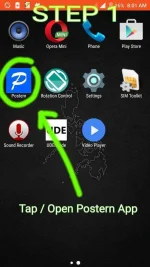
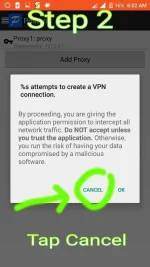
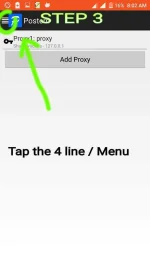
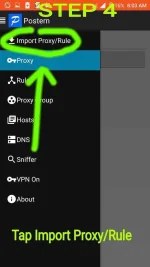
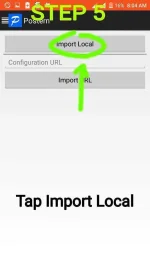
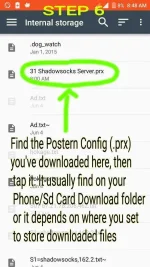
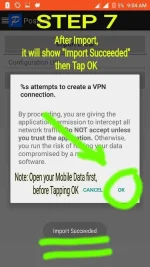
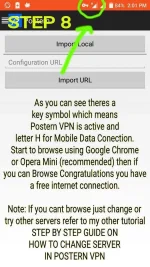
Step 3. Follow the images / pictures.
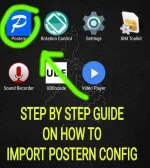
Step by Step Guide On How to Import Postern Config (.prx) Into Postern VPN App with Pictures
How To Have Free Internet
On Your Android 3g/H/H+/4g/Lte
Using Postern Vpn (.Apk) With
Postern Config (.Prx)
***Read this first : Please Change "*" to "." in the links before attemp to download
Step 1. Download and Install
Latest Postern VPN App (.apk):
Download Link --> microify*com/2lLp
Step 2. Download and Import Postern Config below:
***June 10, 2017 (New Update 60 Servers)***
Roaring 60 Shadowsocks Server
Download here --> tinyium*com/3GJQ
***June 07, 2017 (36 Servers)***
1 A Server
Download here --> riffhold*com/31iU
2 B Server
Download here --> riffhold*com/31ih
3 C Server
Download here --> riffhold*com/31iN
4 D Server
Download here --> riffhold*com/31iE
5 E Server
Download here --> riffhold*com/31hv
***June 06, 2017 (25 Servers)***
A Server
Download Link --> userscloud*com/twhokr45562y
B Server
Download Link --> userscloud*com/u9e2m8971gkx
C Server
Download Link --> userscloud*com/ajze4laa0m37
D Server
Download Link --> userscloud*com/ci93f1t7v93i
E Server -
Download Link --> userscloud*com/mp1qlxhlg8ph
***June 05, 2017 (31 Servers)***
31 Shadowsocks Server
Download Link --> userscloud*com/4hxxvdhemc8n
Step 3. Follow the images / pictures.
Step by Step Guide On How to Import Postern Config (.prx) Into Postern VPN App with Pictures