The Best Spotify Music to mρ3 Converter
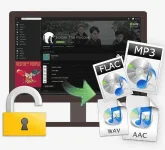
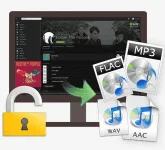
Decrypt and convert Spotify song or playlist to mρ3/AAC/WAV.
Preserve 100% of your original audio’s quality after conversion.
Preserve ID tags after conversion; 5X conversion speed.
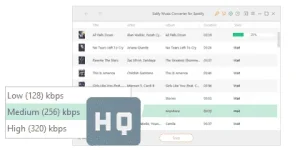
Support variable bitrate (VBR) - better quality with smaller file size.
Highly compatible with the latest Windows 10 and Spotify.
 Sidify Music Converter for Spotify is simply the best choice for those who wish to remove DRM from Spotify music, because it allows to strip off the DRM from any Spotify Music and keep original quality of the audio. After removing DRM, you can enjoy Spotify music on your iPod, iPhone, Zune, PSP, mρ3 player, etc.
 Just with 3 steps, Sidify Music Converter helps you to decrypt and convert Spotify music to plain mρ3, AAC and WAV format. Hard to find a Spotify Music Converter that are stable and secure to convert a complete Spotify playlist? Don't worry, Sidify also supports batch conversion by dragging & dropping a playlist link from Spotify to Sidify.
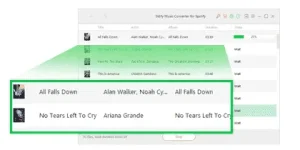
 Preserve metadata and artwork
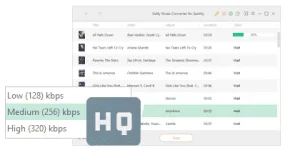
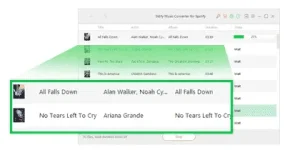
By adopting the advanced and innovative DRM decrypting technology, Sidify music converter can convert Spotify audio files at fast speed and doesn’t diminish the quality of the audio. More importantly! Sidify can help you to keep artwork and artist after conversion.
 Directions:
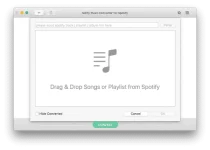
Step 1. Import Songs or Playlist from Spotify to Sidify Music Converter for Spotify
Directions:
Step 1. Import Songs or Playlist from Spotify to Sidify Music Converter for Spotify
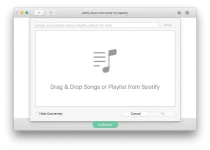
Launch Sidify Music converter for Mac and Spotify application would be opened automatically with it. Click center of Sidify program interface, it will indicate you to drag and drop the single song or whole playlist from Spotify to Sidify program. Check the songs you would like to convert, then click OK.
 Step 2. Choose mρ3 as Output Format
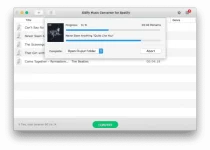
The added Spotify songs would appear on the main panel of Sidify Music Converter, displaying information of music name, artist, duration... Click the option icon on the top right and choose output format as mρ3. By default, Sidify program would convert the songs at 5X fast conversion speed.
Step 3. Start Conversion.
After you have adjusted the settings, it is time to convert the Spotify songs to mρ3 by clicking CONVERT button. Sidify music converter will convert the Spotify songs one by one with lossless quality.
 Step 4. Open Destination Folder to Get the mρ3 Files.
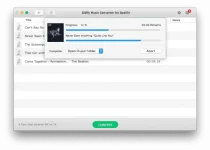
When the conversion process is completed, you can find the mρ3 files which are extracted from Spotify by going to the destination folder. If you don't change the path, the output files would be located under "/Users/YOURNAME/Documents/Sidify Music Converter" by default.
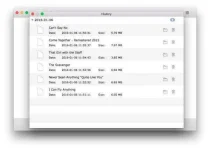
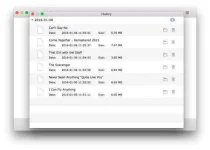
You can also find the output files by clicking History button on the top right and view the conversion history.
 DOWNLOAD LINK
You do not have permission to view the full content of this post.
Log in or register now.
***** (***** - Extract in Directory, Open, Find the Exe File and ***** it)
You do not have permission to view the full content of this post.
Log in or register now.
VIDEO TUTORIAL:
You do not have permission to view the full content of this post.
Log in or register now.
NOTE:
DOWNLOAD LINK
You do not have permission to view the full content of this post.
Log in or register now.
***** (***** - Extract in Directory, Open, Find the Exe File and ***** it)
You do not have permission to view the full content of this post.
Log in or register now.
VIDEO TUTORIAL:
You do not have permission to view the full content of this post.
Log in or register now.
NOTE:
1. Dapat meron na kayong Spotify Web Player na nakainstall sa PC.
2. Sundin ang directions kung paano igrab ang URL sa Spotify. Basahin pong mabuti.
3. WAG PONG SABIHIN NA HINDI NAGANA DAHIL GUMANA YAN SAKIN. TRIED AND TESTED. (Kung may problem talaga, ipost ang problem)
4. WAG NOOB SA PAG-GAMIT NG *****. EASY AS 1,2,3 po yan.
5. Pag marami kayong ida-download at free user lang kayo, iplay ang advertisement pag nagnotify si Sidify sa Spotify application, para makaresume ulit sya sa pag-grab (pag premium user kayo.. walang problema syempre.)
6. WAG MAGPRIVATE SESSION SA SPOTIFY.. MAEENCOUNTER NINYO YUNG "ERROR 1004" AT HINDI KAYO MAGKAKA-DL.
7. WAG RIN ISET SA "REPEAT" ANG PLAYLIST OR SONG. I-OFF ITO dahil maaring marecord ulit yung simula ng song.
8. Sagarin nyo na ang pagdodownload sa spotify, kasi pag nagupdate sila, mahirap ulit humanap ng bagong *****.
Ito Sir try mo.
 PH
PH