 PH
PHDid you ever wonder whats is the secret formula for those HPI/EHI Config that can reach 36mbp.
Im here to reveal those Formulas
But first we need this:
Ok ito na Inhale/Exhale 5x..
Connect xxx.xxx.xxx.xxx:xxx HTTP/1.1=CONNECT [host_port][protocol]
Example:
CONNECT xxx.xxx.xxx.xxx:xxx HTTP/1.1
Host: pogiako.com
X-Online-Host: pogiako.com
CONNECT xxx.xxx.xxx.xxx:xxx HTTP/1.1
equivalent to...
CONNECT [host_port][protocol][crlf]Host: pogiako.com[crlf]X-Online-Host: pogiako.com[crlf][crlf]CONNECT [host_port][protocol]
For those People na may katanungan just ask its free (I admire this people not because hindi sila mka intindi but sa subrang daming tumatakbo sa kanilang isip they forgot how easy to understand simple steps and thats make them Unique)
For Educational Purpose only Hit Like and Follow me for more Revealing TUTS
Sa Google lang to mga paps Re Post ko lng pra nandito na Lahat sa Phcorner
Support nlang natin wag na Bitter pati sa PH meron na Din kala ko sa LOVE lng ...
Im here to reveal those Formulas
But first we need this:
- RawCap.exe Deleted y <---- Download This ... Note " Remove Space between n and y "
- Notepad ++ Deleted <---- Download nyu dito..Note "Remove Space between c and z"
- HPI File
- Target config
- Administrator access (Indeed)
- Brain/Patience
- Presence of mind (kung may problema, lasing, sabog or ano pa yang iniisip nyung nakakawalang gana mag isip please wag nalang muna tung gawin "you cannot enjoy what you accomplish or discover)
Ok ito na Inhale/Exhale 5x..
- Una/1st (shempre palaging una nating gawin)
We must Know kung ano ang IPv4 ng modem or wifi.

If you dont know opend Win+R type CMD -> then type ->ipconfig and find IPv4 Address.
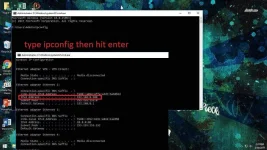
Open Deleted and find IPv4 ng modem or wifi.In my case 192.168.8.100 (open/debrand kasi ang b315s-936 ko)
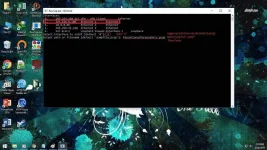
Deleted Section put the designated number in the END example ("1") ito sakin.
Lagay nyu example (DUTERTE.pcap) kahi ano po basta .pcap ang huli
- Pangalawa/2nd (Shempre Kasunod ng nauna)
Open HTTP PROXY INJECTOR
Import the HPI config that you want to Unlock (Roger that)
Press Start (Connected or Disconnected just wait 1min)
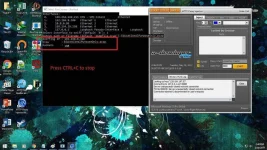
If you notice the Packet of the Rawcap is increasing (hindi ka talga lasing you got it)
Stop the Injector then go to Rawcap press CTRL+C (to stop at para ma save na yung EducationPurposeOnly.pcap)
- Pangatlo/3rd (Alams na ito ang kasunod)
Find the Folder where the rawcap.exe Downloaded
Install Notepad C++
Open Notepad C++ then open the pcap file
- Pangapat/4th (last nato)
Kung my alam ka na sa payload pwede ka na mag skip kasi alam mo na ang mga susunod.
Sa example makikita na ang request method ay CONNECT at Normal ang injection. makikita rin na may roong X-Online-Host, X-Forward-Host, User-Agent, at Keep-Alive na nag mamatch doon sa first picture.
Ibig sabihin kung gagamit ng generator request:connect injection:normal at ichecheck ang
X-Online-Host, X-Forward-Host, User-Agent, at Keep-Alive. At syempre ika copy paste natin yung host (sa example pagead2.googlesyndication.com).
Connect xxx.xxx.xxx.xxx:xxx HTTP/1.1=CONNECT [host_port][protocol]
Example:
CONNECT xxx.xxx.xxx.xxx:xxx HTTP/1.1
Host: pogiako.com
X-Online-Host: pogiako.com
CONNECT xxx.xxx.xxx.xxx:xxx HTTP/1.1
equivalent to...
CONNECT [host_port][protocol][crlf]Host: pogiako.com[crlf]X-Online-Host: pogiako.com[crlf][crlf]CONNECT [host_port][protocol]
For those People na may katanungan just ask its free (I admire this people not because hindi sila mka intindi but sa subrang daming tumatakbo sa kanilang isip they forgot how easy to understand simple steps and thats make them Unique)
For Educational Purpose only Hit Like and Follow me for more Revealing TUTS
Sa Google lang to mga paps Re Post ko lng pra nandito na Lahat sa Phcorner
Support nlang natin wag na Bitter pati sa PH meron na Din kala ko sa LOVE lng ...
