PH
PHjanipusong
Honorary Poster
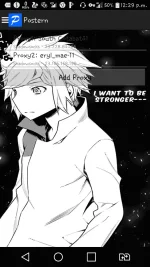
Change Postern Background
from this one ----> to that one
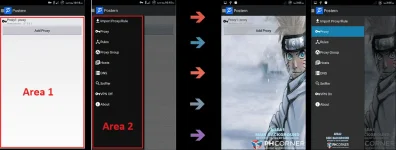
Before we start:
Let's go!!!
What You Need:
->Android Phone
->Latest Postern APK
(Download link Below
You do not have permission to view the full content of this post. Log in or register now.
->APK Editor Pro
(Download link Below
https://android-1.com/en/636-apk-editor-pro-ρáíd.html
->Your Desired Image named as
"area_one.jpg" with 720 x 1280 pixel (horizontal x vertical pixel) for area1 if you want to modify it
"area_two.jpg" with 550 x 1030 pixel (horizontal x vertical pixel) for area2 if you want to modify it
(note: It MUST BE .jpg format! don't say I didn't warn you)
Initial Instructions and Reminders:
Steps:
1.Part 1/3
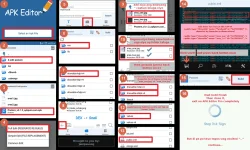
Kung okay na at walang error proceed to Part 2/3
Pag-nag error, might be na may mali kayong ginawa o di kaya ay di niyo nasunod ang isang instruction, so go back from the top.
Nakakapagud? Ganun talaga at first time. But if you badly want your ideal Postern Background you'll do it
2.Part 2/3
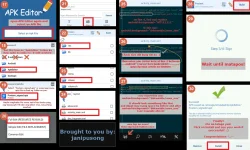
Kung okay na at walang error You should now proceed to Part 3/3 and see your sacrifices
Pag-nag error, might be na may mali kayong ginawa o di kaya ay di niyo nasunod ang isang instruction, so go back from the top of this Part 2/3 (take note: Only Part 2/3)
Nakakapagud na ba? Ganun talaga at kasi nangangalahati ka na sa process!. Just keep going if you badly want your ideal Postern Background, ngayon ka pa ba susuko???
3.Part 3/3
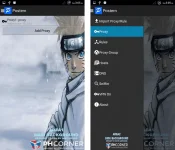
CONGRATULATIONS !!!
Additional:
Para naman sa mga natatamad sa mahabang process.
I will provide a link below for the actual Postern app na ginamit ko sa tutorial na ito.
Download niyo lang.
Edit niyo din with APK Editor Pro, eto pattern:
select apk file>select "Postern_v3.1.2_Edit_Me.apk">Simple Edit>Images>(then replace niyo lang si "area_one.jpg" at "area_two.jpg" ng inyong picture
Download link:
I hope nakatulong ako sa inyo PHC people
Please hit like that like button
and leave a comment naman po for my 1 and half day composing of this tutorial
ikatutuwa ko yun at ikawawala ng pagud ko
Salamat in advance
Para sa mga tanong, comment lang kayo, sasagutin ko yan once online ako
from this one ----> to that one
Before we start:
- Magbasa ng po maigi, at intindihin ng mabuti ang mga instructions
- Wag po matigas ang ulo, just follow me lang muna mamaya na po ang questions kung may mga katanungan, follow the procedures carefully and do as instructed para maging successful ka okay?
- If you won't succeed at first, maybe you committed an error, that's an opportunity for learning, so wag sayangin ang pagkakataon para matuto
Let's go!!!
What You Need:
->Android Phone
->Latest Postern APK
(Download link Below
You do not have permission to view the full content of this post. Log in or register now.
->APK Editor Pro
(Download link Below
https://android-1.com/en/636-apk-editor-pro-ρáíd.html
->Your Desired Image named as
"area_one.jpg" with 720 x 1280 pixel (horizontal x vertical pixel) for area1 if you want to modify it
"area_two.jpg" with 550 x 1030 pixel (horizontal x vertical pixel) for area2 if you want to modify it
(note: It MUST BE .jpg format! don't say I didn't warn you)
Initial Instructions and Reminders:
- Ilagay lahat ng images, at original na postern apk sa phone memory at sa iisang folder, bigyan ng pangalan ang folder ng "$-edit-postern" for easy access.
- mas mainam na isave niyo ang mga sumusunod na pictures,then zoom-in niyo na lang para mas klaro, tatlo lang naman,hanggang sampu lang kasi yata allowed dito sa PHC na pic para sa thread post. Dami kasing screenshoot ko dito, as in bawat click at tap na-screenshoot ko para mas maintindihan niyo.
- Kung di mo gusto na i-modify ang "area1" or ang "area2 vice-versa wag na pong isama sa editing ang isa okay? paganahin ang common sense po natin
Steps:
1.Part 1/3
Kung okay na at walang error proceed to Part 2/3
Pag-nag error, might be na may mali kayong ginawa o di kaya ay di niyo nasunod ang isang instruction, so go back from the top.
Nakakapagud? Ganun talaga at first time. But if you badly want your ideal Postern Background you'll do it
2.Part 2/3
Kung okay na at walang error You should now proceed to Part 3/3 and see your sacrifices
Pag-nag error, might be na may mali kayong ginawa o di kaya ay di niyo nasunod ang isang instruction, so go back from the top of this Part 2/3 (take note: Only Part 2/3)
Nakakapagud na ba? Ganun talaga at kasi nangangalahati ka na sa process!
. Just keep going if you badly want your ideal Postern Background, ngayon ka pa ba susuko??? 3.Part 3/3
CONGRATULATIONS
!!!Additional:
Para naman sa mga natatamad sa mahabang process.
I will provide a link below for the actual Postern app na ginamit ko sa tutorial na ito.
Download niyo lang.
Edit niyo din with APK Editor Pro, eto pattern:
select apk file>select "Postern_v3.1.2_Edit_Me.apk">Simple Edit>Images>(then replace niyo lang si "area_one.jpg" at "area_two.jpg" ng inyong picture
Download link:
I hope nakatulong ako sa inyo PHC people
Please hit like that like
button and leave a comment naman po for my 1 and half day composing of this tutorial
ikatutuwa ko yun at ikawawala ng pagud ko
Salamat in advance
Para sa mga tanong, comment lang kayo, sasagutin ko yan once online ako