 PH
PH How to use Psiphon Free VPN for Globe, Smart and Sun Internet
You access internet freely without restrictions by using Psiphon You do not have permission to view the full content of this post. Log in or register now.. This app may bypass censorship on your network provider and also serve as additional security when you’re on a public connection. This works on older Android OS like Gingerbread, ICS, Jellybean and Kitkat. With its latest release under version 68 it now supports Lollipop mobile operating system. You can also use Psiphon on your desktop and laptop as it supports Windows OS.
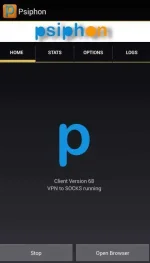
Psiphon Client version 68 running on Android 4+
How to Use Psiphon on your Android phone or tablet?
1.On your device, go to Google Play Store.
2.Search Psiphon then install.
3.Open Psiphone (Note: It will prompt an attention message regarding the use of this app, make sure you agree with what is stated. Just check to trust the application.)
Just as simple as that, you are now ready to use Psiphon on you phone. Open your browser and you good to go.
Psiphon settings
On home tab, you can see the client version you are current using and how are you connected (running in whole device). From there also you can see the Start, Stop and Open Browser button.
Stats tab, you can see number hours or minutes you are connected with Psiphon. It also shows sent and received data with graphical status. Other details like compressed sent and received data also takes place on this tab for your monitoring.
Options tab, here you can select available servers with respective country. On my observation, when you select a country Psiphon will automatically connect to available server on selected country. On following details below, you are given an option to tunnel whole device which requires root or Android 4.0+ operating system. You are also given an option to force root tunnel whole device method. Another option is the “Connect through an HTTP Proxy” where choices are “Use system network settings” or you can manually input the host address and port. More options button is for notification where you can tweak it the way you want.
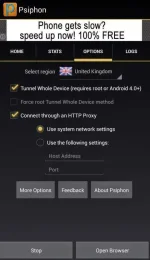
Psiphon network settings
Logs tab, this shows status from the start Psiphon connects to the internet. It also shows current network you are using, server used and services connected (SSH, SOCKS, HTTP Proxy, VPN and ports like 1080 or 8080)
Can I use Psiphon on Globe, Smart and Sun Cellular?
Yes, you can use it on any network as long as you provider doesn’t block this app accessing to their network. Just use the default respective network settings in connecting to the internet then run Psiphon. When you are connected, you’ll notice a color blue “P” on home tab while when you still connecting and not yet connected you can see color red “P”.
Here are the settings to connect using Psiphon
Globe Telecom (Prepaid and Postpaid) / TM
Prepaid:
Connection name: myGlobe iNet
APN: http.globe.com.ph
Postpaid:
Connection name: myGlobe Internet
APN: internet.globe.com.ph
Smart Communications
Connection name: Smart Internet
APN: internet
Connection name: Sun Internet
APN:minternet
ABS CBN Mobile
Connection name: ABS CBN Mobile Internet
APN: internet.abs-cbn.com.ph
For PC/Windows version of Psiphon, just download then run the app and it will automatically connect you to the internet. You can also use this on your USB broadband and pocket Wi-Fi, just set the correct APN on the network you are currently using then that’s it. Unlike other VPN app, Psiphon is free and one of the best You do not have permission to view the full content of this post. Log in or register now. you can find out there.
If you're using You do not have permission to view the full content of this post. Log in or register now. for Android do check You do not have permission to view the full content of this post. Log in or register now..
On my test with Psiphon over mobile network, it works like a trick, hide you current location while you are browsing, compresses data usage and more. Don’t get confuse if you’re not redirected to a certain sites domain extension when you are using this app.
You access internet freely without restrictions by using Psiphon You do not have permission to view the full content of this post. Log in or register now.. This app may bypass censorship on your network provider and also serve as additional security when you’re on a public connection. This works on older Android OS like Gingerbread, ICS, Jellybean and Kitkat. With its latest release under version 68 it now supports Lollipop mobile operating system. You can also use Psiphon on your desktop and laptop as it supports Windows OS.
Psiphon Client version 68 running on Android 4+
How to Use Psiphon on your Android phone or tablet?
1.On your device, go to Google Play Store.
2.Search Psiphon then install.
3.Open Psiphone (Note: It will prompt an attention message regarding the use of this app, make sure you agree with what is stated. Just check to trust the application.)
Just as simple as that, you are now ready to use Psiphon on you phone. Open your browser and you good to go.
Psiphon settings
On home tab, you can see the client version you are current using and how are you connected (running in whole device). From there also you can see the Start, Stop and Open Browser button.
Stats tab, you can see number hours or minutes you are connected with Psiphon. It also shows sent and received data with graphical status. Other details like compressed sent and received data also takes place on this tab for your monitoring.
Options tab, here you can select available servers with respective country. On my observation, when you select a country Psiphon will automatically connect to available server on selected country. On following details below, you are given an option to tunnel whole device which requires root or Android 4.0+ operating system. You are also given an option to force root tunnel whole device method. Another option is the “Connect through an HTTP Proxy” where choices are “Use system network settings” or you can manually input the host address and port. More options button is for notification where you can tweak it the way you want.
Psiphon network settings
Logs tab, this shows status from the start Psiphon connects to the internet. It also shows current network you are using, server used and services connected (SSH, SOCKS, HTTP Proxy, VPN and ports like 1080 or 8080)
Can I use Psiphon on Globe, Smart and Sun Cellular?
Yes, you can use it on any network as long as you provider doesn’t block this app accessing to their network. Just use the default respective network settings in connecting to the internet then run Psiphon. When you are connected, you’ll notice a color blue “P” on home tab while when you still connecting and not yet connected you can see color red “P”.
Here are the settings to connect using Psiphon
Globe Telecom (Prepaid and Postpaid) / TM
Prepaid:
Connection name: myGlobe iNet
APN: http.globe.com.ph
Postpaid:
Connection name: myGlobe Internet
APN: internet.globe.com.ph
Smart Communications
Connection name: Smart Internet
APN: internet
Connection name: Sun Internet
APN:minternet
ABS CBN Mobile
Connection name: ABS CBN Mobile Internet
APN: internet.abs-cbn.com.ph
For PC/Windows version of Psiphon, just download then run the app and it will automatically connect you to the internet. You can also use this on your USB broadband and pocket Wi-Fi, just set the correct APN on the network you are currently using then that’s it. Unlike other VPN app, Psiphon is free and one of the best You do not have permission to view the full content of this post. Log in or register now. you can find out there.
If you're using You do not have permission to view the full content of this post. Log in or register now. for Android do check You do not have permission to view the full content of this post. Log in or register now..
On my test with Psiphon over mobile network, it works like a trick, hide you current location while you are browsing, compresses data usage and more. Don’t get confuse if you’re not redirected to a certain sites domain extension when you are using this app.