 PH
PH-
Welcome to PHCorner Forums! Sign up for free to unlock full access and exclusive privileges, including:
- Asking questions about computer and mobile issues
- Discovering internet tips for your mobile network and computer
You are using an out of date browser. It may not display this or other websites correctly.
You should upgrade or use an alternative browser.
You should upgrade or use an alternative browser.
❓ Help Http 1.1 / 403 forbidden problem
- Thread starter deadmans96
- Start date
- Status
- Not open for further replies.
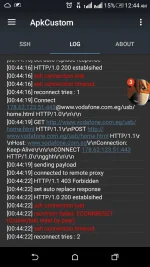
Base sa experience ko jan Madaming pwedeng reason either s ssh port, rp and method. Una sa ssh port ang 22 kasi is dafault as open ssh. Try to change sa 443(https) kung papayagan papasukin ng rp mo. Pangalawa sa rp, minsan hindi allowed nung rp ang method n gamit mo at binoblock nya yun port ng ssh. Try to use squid ng ssh na pinagawaan mo ng ssh. 3rd is payload yun request method cguro ng payload mo is my specific method lang n pupwede like GET,HEAD,PUT,POST,OPTION. my mga tutorials dito kung panu ang pag generate ng payload in different methods.
deadmans96
Journeyman
Jr Masters22
This is the payload i use here in Egypt on vodafone network
Connect [host_port]@www.vodafone.com.eg/usb/home.html [protocol][crlf][crlf][split]GET You do not have permission to view the full content of this post. Log in or register now. HTTP/1.1 200 OK[crlf]POST You do not have permission to view the full content of this post. Log in or register now. HTTP/1.1[crlf]Host: You do not have permission to view the full content of this post. Log in or register now.: Keep-Alive[crlf][crlf]CONNECT [host_port] HTTP/1.0[crlf]gghh[crlf][crlf]
This is the payload i use here in Egypt on vodafone network
Connect [host_port]@www.vodafone.com.eg/usb/home.html [protocol][crlf][crlf][split]GET You do not have permission to view the full content of this post. Log in or register now. HTTP/1.1 200 OK[crlf]POST You do not have permission to view the full content of this post. Log in or register now. HTTP/1.1[crlf]Host: You do not have permission to view the full content of this post. Log in or register now.: Keep-Alive[crlf][crlf]CONNECT [host_port] HTTP/1.0[crlf]gghh[crlf][crlf]
Chineck ko ang payload mo 200 status yung response maghunt ka ng proxing stable sa payload mo at yung ssh port gawin mong 80 kung hindi mag work change to 443Jr Masters22
This is the payload i use here in Egypt on vodafone network
Connect [host_port]@www.vodafone.com.eg/usb/home.html [protocol][crlf][crlf][split]GET You do not have permission to view the full content of this post. Log in or register now. HTTP/1.1 200 OK[crlf]POST You do not have permission to view the full content of this post. Log in or register now. HTTP/1.1[crlf]Host: You do not have permission to view the full content of this post. Log in or register now.: Keep-Alive[crlf][crlf]CONNECT [host_port] HTTP/1.0[crlf]gghh[crlf][crlf]
It seems that your payload has a lot of allowed method. You may use those method for your payload.zaxcal
amazing my brother
I always use port 443 i had never used port 22 here in Egypt
How can i use Squid proxy on ssh ?
Can i get your tutorials links
Thank you with your help
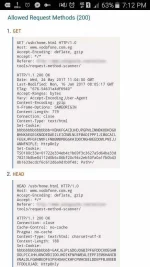
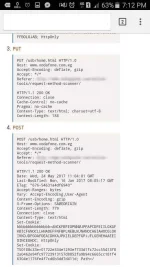
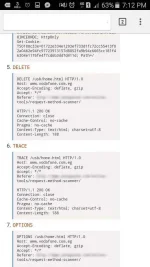
For squid, you may try these:
185.13.39.6:3128
138.0.152.162:3128
Vodafone
10.202.2.60
It may depend on your mobile carrier.. i try using your payload to one of the method allowed Check my ss it is 200 connection established and connected:zaxcal i'am really sorry my brorher i get confused
Can you give me an examble how to make correctly payload with any method mentioned above
Secondly
Where should i put these squad proxies and is it port 3128 may be forbidden here in egypt
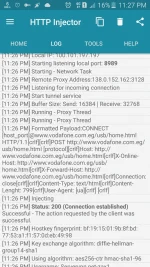
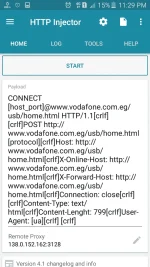
Put the squid proxy to injector's remote proxy.
Thats it. Just explore.. but as i have said it depend on your mobile carrier.
Change your ssh account. Try to create in tcpvpn, servervpn, portssh and use their squid proxy or the one i gave.zaxcal
Woow you have connectected with this payload , so the problem doesn't deal with payload how can i connect to this payload for examble
It's little confused to not identify the problem almostly
@zaxca
zaxcal you tutorial look good bro. Can I on you or whatsapp? +27760647755Change your ssh account. Try to create in tcpvpn, servervpn, portssh and use their squid proxy or the one i gave.
- Status
- Not open for further replies.
About this Thread
-
12Replies
-
4KViews
-
5Participants
Last reply from:
Mbite
Mbite
New Topics
-
Ovpn unlitiktok globe
- Started by dark0112
- Replies: 0
- ❓ Mobile Network Discussion & Support
-
Free data pagnagload?
- Started by Ryuwin
- Replies: 1
- ❓ Mobile Network Discussion & Support
-
GOMO APNs Recommendation
- Started by PHC-Cmmnd
- Replies: 0
- ❓ Mobile Network Discussion & Support
-
Baka po may sms bomber po kayo
- Started by Ichi2
- Replies: 2
- ❓ Mobile Network Discussion & Support
-
Facebook ayaw ma buksan
- Started by ShaAma
- Replies: 0
- ❓ Mobile Network Discussion & Support
-
Unli tiktok parin ba ang sulit ngayon kay Globe?
- Started by Chili Mansi
- Replies: 0
- ❓ Mobile Network Discussion & Support
-
Tiktok Affiliate PH kahit nasa ibang bansa
- Started by jetpo05
- Replies: 0
- ❓ Mobile Network Discussion & Support
-
Unlidata na no cap
- Started by akotaz23
- Replies: 1
- ❓ Mobile Network Discussion & Support
Trending Topics
-
-
-
-
Postern old vpn 2017 working on piso wifi vendo machine no hulog 2027 TCP with payload
- TEAM-FREENET
Replies: 4 -
-
-
-
-
-
Online now
- Members online
- 1,042
- Guests online
- 13,992
- Total visitors
- 15,034