 PH
PHXena Gabrielle
Eternal Poster
This A Very Useful trick who want to hide their data.
Just follow the steps as given below :
1) Go to Start > Run > type “diskpart”.
A DOS window will appear with following description.
DISKPART>
2) Then type “list volume”
The result will look something like one as shown below-
3) Suppose you want to hide drive E then type “select volume 4”
Then a message will appear in same window { Volume 4 is the selected volume}
4) Now type “remove letter E”
Now a message will come { Diskpart Removed the Drive letter }
If You want your partiton back then you have to do this process.
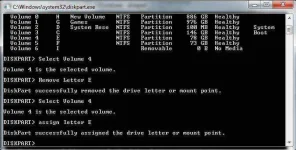
You have to do the same process which you done to hide drive but in the 4th step you have to write “ASSIGN LETTER E”.this command will unhide your drive.
Now Enjoy this cool trick
Just follow the steps as given below :
1) Go to Start > Run > type “diskpart”.
A DOS window will appear with following description.
DISKPART>
2) Then type “list volume”
The result will look something like one as shown below-
3) Suppose you want to hide drive E then type “select volume 4”
Then a message will appear in same window { Volume 4 is the selected volume}
4) Now type “remove letter E”
Now a message will come { Diskpart Removed the Drive letter }
If You want your partiton back then you have to do this process.
You have to do the same process which you done to hide drive but in the 4th step you have to write “ASSIGN LETTER E”.this command will unhide your drive.
Now Enjoy this cool trick