 PH
PHOpen data 3GH+ icon
APN: http.globe.com.ph
APN Type: default
Mabilis sa downloading and streaming movies, gamit ang "Vidmate" pati dn sa youtube video streaming/downloadng.
Share ko lng. )
)
1st: download choose "Cheatdroid or APK Editor" sa Google Play Store.
2nd: Choose, "Amaze VPN/Hot VPN or Eagle VPN" sa Google Play Store
Hot VPN Gamit ko.
1st: Open " Hot VPN", then click select server.
Check kung naka-unluck lahat ng VIP Server turbo, kung ok na then back to home screen.
Cheatdroid Gamit ko
2nd: Open "Cheatdroid"(Rooted) Phone
Cheatdroid requesting root permision.
√ or Tap sa "Grant"
1: Scroll then search.
Find the editing VPN server.
Click ...."Hot VPN"....
2: Scroll down then search.
Click ...."VPNDataCache.xml"....
3: Scroll down then search.
Click...."VPN_SERVER_LIST"....
Tap at d' "center screen list board" para mag open ang editing nya sa VPN_SERVER_LIST
Lahat ng nakikita nyong ....":true,"....change lng sa ....":false,"....
Sa below [string] naka set nayan sa ":false,".... unluck vpn server CANADA turbo....
[String]
[{"id":"348","vpnTitle":"Canada 1","serverHost":"159.203.29.24","serverSignal":"turbo","country":"CA","isVip":false,"countryFlag":"CA","countryFlagUrl":"","serverGroup":"1","serverGroupCount":"1","serverMethod":"aes-128-cfb","serverPort":"8404","serverPW":"abc123","freeDefault":false,"vipDefault":false,"status":"1","checkServerUrl":[""],"checkConnectSuccessUrl":["http:\/\/138.68.28.35:8080\/test.txt","http:\/\/139.59.24.123:8080\/test.txt","http:\/\/178.62.16.4:8080\/test.txt","http:\/\/159.203.29.24:8080\/
Kung sisispagin man?, scroll down change nyo na lahat sa ":false," all unluck Region VIP VPN SERVER.
Click "SAVE" nxt, sa taas right click then "SAVE" ulit.
Pag successfull na ung file ng na edit.
Back to Home Screen.
Open App "Hot VPN"
Click: "Select Region" kung naka Unluck lahat ng VIP VPN Server turbo, choose any Region "turbo. Canada
Wait sa Connected.
Next:
1: Download any Movies, wala sa Google play store ito.
Choose "Showbox/
Movie HD/Megabox or Terrarium TV"
You do not have permission to view the full content of this post. Log in or register now.
You do not have permission to view the full content of this post. Log in or register now.
You do not have permission to view the full content of this post. Log in or register now.
You do not have permission to view the full content of this post. Log in or register now.
2: Download "Vidmate"
You do not have permission to view the full content of this post. Log in or register now. or Vidmate apk raw
Ito ang tutorial kung pano mag download.
I Using Megabox.
Choose any update coming movies.
1. Tap
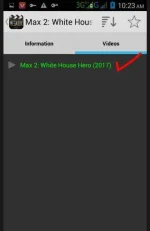
2. Tap Costum
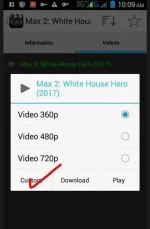
3. Tap Video Player "Vidmate"
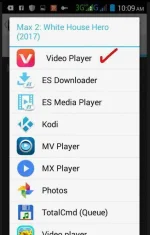
4. Click Downloading down arrow.
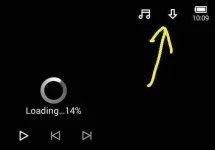
5. ito na sya, un lng po.
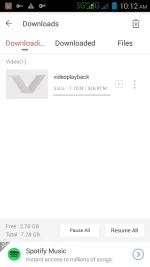
Sa downloading Youtube video naman, Open "Vidmate" lng po tas Choose click sa youtube, may makikita ka doon na ready to download "Pulang logo na arrow" pag my na pili ka ng papaonorin sa youtube, meron dng Video mp4 to music mp3 download, ok po yan kung music video ang pipiliin to mp3.
Good luck po mga KA-PH now lng nag post. hehe
APN: http.globe.com.ph
APN Type: default
Mabilis sa downloading and streaming movies, gamit ang "Vidmate" pati dn sa youtube video streaming/downloadng.
Share ko lng.
)1st: download choose "Cheatdroid or APK Editor" sa Google Play Store.
2nd: Choose, "Amaze VPN/Hot VPN or Eagle VPN" sa Google Play Store
Hot VPN Gamit ko.
1st: Open " Hot VPN", then click select server.
Check kung naka-unluck lahat ng VIP Server turbo, kung ok na then back to home screen.
Cheatdroid Gamit ko
2nd: Open "Cheatdroid"(Rooted) Phone
Cheatdroid requesting root permision.
√ or Tap sa "Grant"
1: Scroll then search.
Find the editing VPN server.
Click ...."Hot VPN"....
2: Scroll down then search.
Click ...."VPNDataCache.xml"....
3: Scroll down then search.
Click...."VPN_SERVER_LIST"....
Tap at d' "center screen list board" para mag open ang editing nya sa VPN_SERVER_LIST
Lahat ng nakikita nyong ....":true,"....change lng sa ....":false,"....
Sa below [string] naka set nayan sa ":false,".... unluck vpn server CANADA turbo....
[String]
[{"id":"348","vpnTitle":"Canada 1","serverHost":"159.203.29.24","serverSignal":"turbo","country":"CA","isVip":false,"countryFlag":"CA","countryFlagUrl":"","serverGroup":"1","serverGroupCount":"1","serverMethod":"aes-128-cfb","serverPort":"8404","serverPW":"abc123","freeDefault":false,"vipDefault":false,"status":"1","checkServerUrl":[""],"checkConnectSuccessUrl":["http:\/\/138.68.28.35:8080\/test.txt","http:\/\/139.59.24.123:8080\/test.txt","http:\/\/178.62.16.4:8080\/test.txt","http:\/\/159.203.29.24:8080\/
Kung sisispagin man?, scroll down change nyo na lahat sa ":false," all unluck Region VIP VPN SERVER.
Click "SAVE" nxt, sa taas right click then "SAVE" ulit.
Pag successfull na ung file ng na edit.
Back to Home Screen.
Open App "Hot VPN"
Click: "Select Region" kung naka Unluck lahat ng VIP VPN Server turbo, choose any Region "turbo. Canada
Wait sa Connected.
Next:
1: Download any Movies, wala sa Google play store ito.
Choose "Showbox/
Movie HD/Megabox or Terrarium TV"
You do not have permission to view the full content of this post. Log in or register now.
You do not have permission to view the full content of this post. Log in or register now.
You do not have permission to view the full content of this post. Log in or register now.
You do not have permission to view the full content of this post. Log in or register now.
2: Download "Vidmate"
You do not have permission to view the full content of this post. Log in or register now. or Vidmate apk raw
Ito ang tutorial kung pano mag download.
I Using Megabox.
Choose any update coming movies.
1. Tap
2. Tap Costum
3. Tap Video Player "Vidmate"
4. Click Downloading down arrow.
5. ito na sya, un lng po.
Sa downloading Youtube video naman, Open "Vidmate" lng po tas Choose click sa youtube, may makikita ka doon na ready to download "Pulang logo na arrow" pag my na pili ka ng papaonorin sa youtube, meron dng Video mp4 to music mp3 download, ok po yan kung music video ang pipiliin to mp3.
Good luck po mga KA-PH now lng nag post. hehe