 PH
PHFirst tutorial ko po. Wish to work with all of you. I tried my best to make this understandable 
Requirements:
1. Internet (Mobile Data or Wifi (Recommended))
2. IOS Phones
3. Wingy App
4. ShadowSock Account
5. Common Sense (IMPORTANT)
Instructions:
1. Download Wingy on App Store

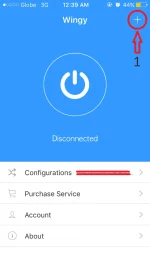
2. Open Wingy and click the + sign at the upper right corner of the screen
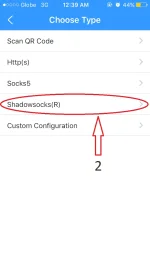
3. Choose your preferred options, but we were going to choose Shadowsocks(R)
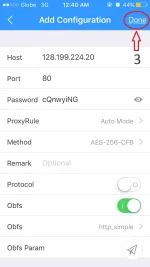
4. Fill up all the required fields. (This one is free. Hanap kayo ng iba pang account. Maraming nagkalat dyan. Credits kay Sir Milton for this account! CHEERS!). Then Click Done located at the upper right corner of the screen.
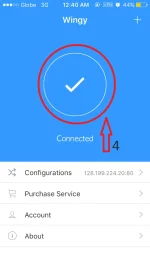
5. Click the I/O or power like button at the home page of the app then when connected it will turn into Check logo.(See picture below)
6. You're DONE!
NOTES:
You must be connected to internet for this to work. Its either use your mobile data or hotspot (hotspot is recommended for better connection). CDC lang po pag medyo mabagal at hindi maka connect.
GOODLUCK! CHEERS!
Requirements:
1. Internet (Mobile Data or Wifi (Recommended))
2. IOS Phones
3. Wingy App
4. ShadowSock Account
5. Common Sense (IMPORTANT)
Instructions:
1. Download Wingy on App Store
2. Open Wingy and click the + sign at the upper right corner of the screen
3. Choose your preferred options, but we were going to choose Shadowsocks(R)
4. Fill up all the required fields. (This one is free. Hanap kayo ng iba pang account. Maraming nagkalat dyan. Credits kay Sir Milton for this account! CHEERS!). Then Click Done located at the upper right corner of the screen.
5. Click the I/O or power like button at the home page of the app then when connected it will turn into Check logo.(See picture below)
6. You're DONE!
NOTES:
You must be connected to internet for this to work. Its either use your mobile data or hotspot (hotspot is recommended for better connection). CDC lang po pag medyo mabagal at hindi maka connect.
GOODLUCK! CHEERS!