 PH
PHjanipusong
Honorary Poster
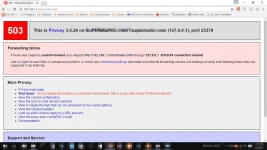
Reason for this: kasamang nasasama sa pag-proxy kasi ng SSCap ang IP ng WiFi mo
Solution: Add mo ang IP ng wifi mo sa Exceptions ng Proxy Settings
Let's fix it...
STEPS:
Step 1

Step 2

Step 3
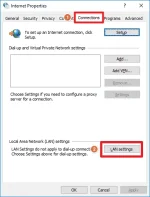
Step 4
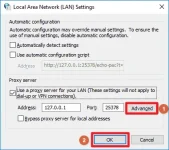
Step 5
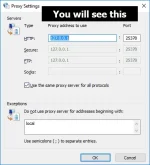
Step 6
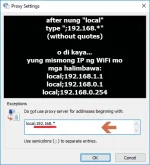
PROOF

==================================================================
Para sa mga natatamad naman sa steps na nasa taas
download niyo lang po itong exe file (around 200kb)
link: Do_Not_Proxy_WiFi_On_SSCap.exe
>Select "Do_Not_Proxy_WiFi_On_SSCap.exe"
> right click
> run as administrator
> Enter IP address of your WiFi
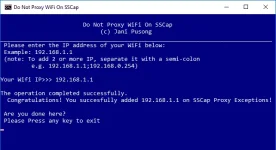
Congratulations!
Feel free to ask questions po
Sisikapin kong sagutin yan kung kaya ko,
If di ko naman masagot, we have a lot of masters out there
Please hit Like kung nakatulong and leave a feedback
==================================================================
Para sa mga natatamad naman sa steps na nasa taas
download niyo lang po itong exe file (around 200kb)
link: Do_Not_Proxy_WiFi_On_SSCap.exe
>Select "Do_Not_Proxy_WiFi_On_SSCap.exe"
> right click
> run as administrator
> Enter IP address of your WiFi
Congratulations!
Feel free to ask questions po
Sisikapin kong sagutin yan kung kaya ko,
If di ko naman masagot, we have a lot of masters out there
Please hit Like kung nakatulong and leave a feedback