 PH
PHThere are so many software available on internet claiming to monitor the activities of the computer, however all they require is Internet, huge hard disk space or some more penny which is obviously not comfortable with Geeks like us.
So here I come up with a temporary and simple solution for this. I'll explain it later in the article, if required as its quite simple. Just follow the Steps:
Open Notepad. Copy the below script:
echo. >> logs.txt
TIME /T >> logs.txt
DATE /T >> logs.txt
echo %USERNAME% >> logs.txt
Save it as spy.bat
Now simply copy this file to the Startup folder which is most probably located at: start menu > Accessories and scroll down to get it. (if by simply copying this file wont work with you, then you probably need to copy the file in All Startup folder.) Alternatively, you can also create a shortcut to your file in Startup folder.
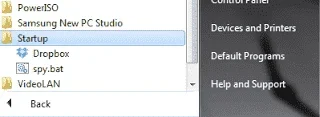
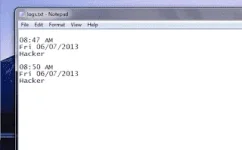
That's it. Now whenever your PC will reboot, the provided script will execute and create a logs.txt file with appropriate TIME,DATA and USERNAME who's responsible for the LOG IN.
Simple enough.
As this method is not much good for those users who wants to get the exact identity of the user OR want an image of the user
courtesy of: http://www.häçkthedark.com
So here I come up with a temporary and simple solution for this. I'll explain it later in the article, if required as its quite simple. Just follow the Steps:
Open Notepad. Copy the below script:
echo. >> logs.txt
TIME /T >> logs.txt
DATE /T >> logs.txt
echo %USERNAME% >> logs.txt
Save it as spy.bat
Now simply copy this file to the Startup folder which is most probably located at: start menu > Accessories and scroll down to get it. (if by simply copying this file wont work with you, then you probably need to copy the file in All Startup folder.) Alternatively, you can also create a shortcut to your file in Startup folder.
That's it. Now whenever your PC will reboot, the provided script will execute and create a logs.txt file with appropriate TIME,DATA and USERNAME who's responsible for the LOG IN.
Simple enough.
As this method is not much good for those users who wants to get the exact identity of the user OR want an image of the user
courtesy of: http://www.häçkthedark.com