PH
PHKaasar yung mac dahil sa kaselfish noh? hahaha
pero alam mo ba ang paraan para makapagsync ka ?
simple lang naman,
Requirements:
brain, itunes , usb connector ng iphone, at laptop/pc
pareho lng yan sila ng movie
pero alam mo ba ang paraan para makapagsync ka ?
simple lang naman,
Requirements:
brain, itunes , usb connector ng iphone, at laptop/pc
- Connect your iPhone 6 to PC via matched USB cable.
- Open iTunes. For the first connection, a window will pop out. Click “Continue” to allow iTunes to read your iPhone data. At the same time, another dialog will come out on your iPhone, on which you could tap “Trust” to continue.
- After that, click the phone icon on the left corner of the interface. To manage your media files manually, you’d better go to “Options” under “Summary” tab, cancel “Automatically sync when this iPhone is connected” and check “Manually manage music and videos”. Don’t forget to click “Apply” when it’s done.
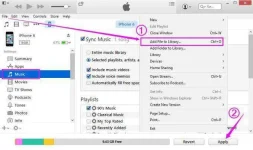
- Import music into iTunes library from computer by clicking “File” and then “Add File to Library”. Once transferred successfully, you can select the music icon on top to see all the songs.
- Now, click “Music” under “Settings” tab. Choose “Sync Music”. You can either sync entire music library or selected playlists as you like. Then click “Apply” button at the bottom.
pareho lng yan sila ng movie