PH
PHPentagon El Cero Miedo
Forum Veteran
Good Day, mga Ka-PHC! It's Dhongzkie98 here, giving you some of the accounts that are way too good for streaming, youtube, downloading, and browsing. If you're not familiar with the QRCodes and how to import it, please check the instructions below..
SERVER 1
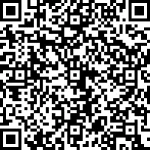
{"server":"153.125.234.178","server_port":31422,"password":"kingss.win","method":"aes-256-cfb"}
SERVER 2
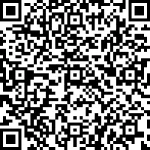
{"server":"153.125.234.179","server_port":31939,"password":"kingss.win","method":"aes-256-cfb"}
SERVER 3
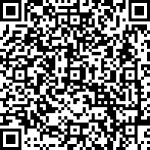
{"server":"153.125.234.173","server_port":31228,"password":"kingss.win","method":"aes-256-cfb"}
SERVER 4
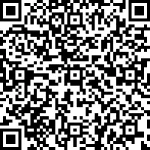
{"server":"153.125.234.173","server_port":31187,"password":"kingss.win","method":"aes-256-cfb"}
How to import QR Code?
For SSCap Users:
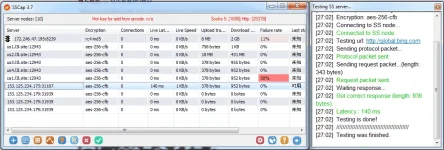
Just open SSCap, then on the bottom left part, you'll see a blue button with squares, click that button.
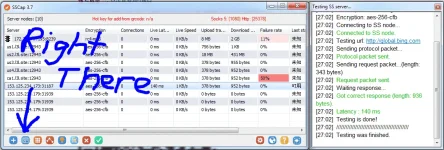
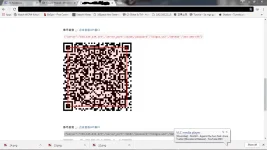
Then drag your mouse to scan the QR Code above.
For SSR Users:
Open ShadowSocksR, then right click the SSR icon on the icon bar then click scan QRCode
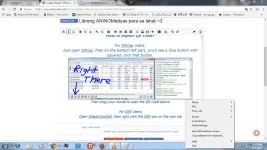
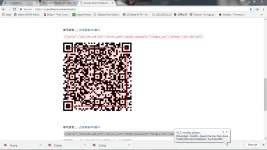
TIP: Make sure once na magiiscan ng QRCode, make sure na visible ang buong QRCode sa screen like this. so that it will be scaaned and imported.
For Postern Users:
Open Postern, go to Add Proxy, and type the credentials.
If you want to me to share more Shadowsocks Accounts, give this thread a Like! and for god's sake, please give feedback and a thanks
SERVER 1
{"server":"153.125.234.178","server_port":31422,"password":"kingss.win","method":"aes-256-cfb"}
SERVER 2
{"server":"153.125.234.179","server_port":31939,"password":"kingss.win","method":"aes-256-cfb"}
SERVER 3
{"server":"153.125.234.173","server_port":31228,"password":"kingss.win","method":"aes-256-cfb"}
SERVER 4
{"server":"153.125.234.173","server_port":31187,"password":"kingss.win","method":"aes-256-cfb"}
How to import QR Code?
For SSCap Users:
Just open SSCap, then on the bottom left part, you'll see a blue button with squares, click that button.
Then drag your mouse to scan the QR Code above.
For SSR Users:
Open ShadowSocksR, then right click the SSR icon on the icon bar then click scan QRCode
TIP: Make sure once na magiiscan ng QRCode, make sure na visible ang buong QRCode sa screen like this. so that it will be scaaned and imported.
For Postern Users:
Open Postern, go to Add Proxy, and type the credentials.
If you want to me to share more Shadowsocks Accounts, give this thread a Like! and for god's sake, please give feedback and a thanks