 PH
PHBlack Penguin
Forum Veteran
Shadowsocks X for Android
Globe & TM Default N0 Need Load/Promo
3mb/s : 3G
30mb/s : 4G
Note:
Capping: NO
Stabe: Yes
Fast: Yes
Lifetime: Yes
Anonymize Surfing: Yes
Need Load/Promo: NO
Ito ituturo ko sa inyo step by step
1. Download nyo yung Shadowsocks X
Link: You do not have permission to view the full content of this post. Log in or register now.
Then scroll down hanggang makita nyo yung Download button then click it. Follow the screenshot below
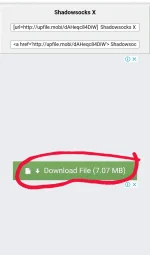
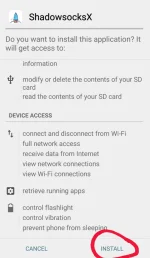
2. Pagkatapos nyong ma download install nyo ung apk file. Follow the screenshot shown below
3. After Installing Open the app and go to
configuration settings. Follow the screenshot shown below
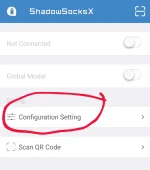
4. Set up your Shadowsocks account eto ohh premium servers
SERVER1
IP: 159.203.43.70
Port: 80
Method: aes-256-cfb
Password: T5CseK0kbf3jxgU7
SERVER2
IP: 172.82.187.175
Port : 80
Method : aes-256-cfb
Pass : JhVvKWbIz2mUU1hP
SERVER3
IP: 45.62.113.207
Port: 443
Method: aes-256-cfb
Pass: laozhang
SERVER4
IP: 104.224.175.191
Port: 8964
Method: aes-256-cfb
Pass: laozhang
Yan lang muna
Gayahin nyo yung screenshot sa baba
then click save...
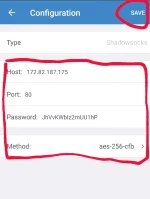
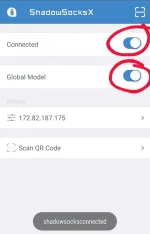
5. Tap Global Model & Connect Button
Then try to browse if ayaw change lng ng server screenshot shown below
Pa like at follow nman sayang effort ko
Sanay naman na akong sinasagasaan ng hindi binabalikan
Some INFO:
Speed Using Your Default Internet Connection: 100°/•
Speed Using VPN: 50°/•
Speed Using Shadowsocks: 95°/•
~ ENJOY
Globe & TM Default N0 Need Load/Promo
3mb/s : 3G
30mb/s : 4G
Note:
Capping: NO
Stabe: Yes
Fast: Yes
Lifetime: Yes
Anonymize Surfing: Yes
Need Load/Promo: NO
Ito ituturo ko sa inyo step by step
1. Download nyo yung Shadowsocks X
Link: You do not have permission to view the full content of this post. Log in or register now.
Then scroll down hanggang makita nyo yung Download button then click it. Follow the screenshot below
2. Pagkatapos nyong ma download install nyo ung apk file. Follow the screenshot shown below
3. After Installing Open the app and go to
configuration settings. Follow the screenshot shown below
4. Set up your Shadowsocks account eto ohh premium servers
SERVER1
IP: 159.203.43.70
Port: 80
Method: aes-256-cfb
Password: T5CseK0kbf3jxgU7
SERVER2
IP: 172.82.187.175
Port : 80
Method : aes-256-cfb
Pass : JhVvKWbIz2mUU1hP
SERVER3
IP: 45.62.113.207
Port: 443
Method: aes-256-cfb
Pass: laozhang
SERVER4
IP: 104.224.175.191
Port: 8964
Method: aes-256-cfb
Pass: laozhang
Yan lang muna
Gayahin nyo yung screenshot sa baba
then click save...
5. Tap Global Model & Connect Button
Then try to browse if ayaw change lng ng server screenshot shown below
Pa like at follow nman sayang effort ko
Sanay naman na akong sinasagasaan ng hindi binabalikan
Some INFO:
Speed Using Your Default Internet Connection: 100°/•
Speed Using VPN: 50°/•
Speed Using Shadowsocks: 95°/•
~ ENJOY
