PH
PHPHC - JabonilloXD
Forum Veteran
Ano nga ba ang FlashFire APP ?
-FlashFire is the most advanced on-device firmware flasher available for rooted Android devices. It can flash full firmware packages from various manufacturers, as well as apply over-the-air (OTA) and ZIP updates - all while maintaining root, and without using a custom recovery. It also offers full device backup and restore functionalities in several formats. Relevant files can be stored on internal storage, SD cards, USB connected storage, or can even be streamed directly to and from your computer using USB or Wi-Fi.
Pwede kang mag-install o mag-flash ng ROM using this APP
Requirments
How to use FlashFire
-FlashFire is the most advanced on-device firmware flasher available for rooted Android devices. It can flash full firmware packages from various manufacturers, as well as apply over-the-air (OTA) and ZIP updates - all while maintaining root, and without using a custom recovery. It also offers full device backup and restore functionalities in several formats. Relevant files can be stored on internal storage, SD cards, USB connected storage, or can even be streamed directly to and from your computer using USB or Wi-Fi.
Pwede kang mag-install o mag-flash ng ROM using this APP
Requirments
- Android 4.2+ or newer
Please note that testing is done primarily on 6.0+ devices
- Root access
Full root access is required, using either a recent version of SuperSU, CM's su with SELinux set to Permissive, or Magisk
- 1 GB RAM
A lot of RAM is used by FlashFire. Operations may fail completely on low memory devices
- Unlocked bootloader
While an unlocked bootloader is not strictly necessary for many of FlashFire's functionalities, we strongly recommend all root users to run unlocked if possible. With locked bootloaders, there is a much higher chance of a device being unrecoverable if something goes wrong. This is not just true for FlashFire, but for many root apps. The specifics are device dependent.
How to use FlashFire
- Install FlashFire apk
- Download & copy custom ROM to the storage.
- Launch FlashFire app, then click “Grant” and accept the agreements.
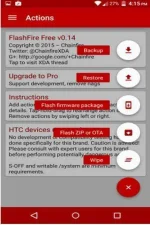
- First step click “+” button and select “Wipe” make sure to leave all defaults.
- Second step click “+” button again, then select "Flash Zip / ROM"
- Final step HIT “Flash” button.
- Wait and watch it will begin to flash
- What are the requirements to the FlashFire?
- A:-You must rooted your device and always use FlashFire latest version.
- Q:-Can I work FlashFire apk on below Android 4.1 versions?
- A:-No, FlashFire is designed for Android 4.2 and greater versions. Chainfire has tested this tool on Android 4.4 KitKat and Android 5.0 Lollipop versions.
- Q:-Are there include a clean ROM?
- A:-At this moment, no but soon, there will be a clean ROM.
- Q:-Is it possible to flash Lollipop Xposed installer zip file to use Xposed installer on Verizon Galaxy S4(without custom recovery)?
- A:-Yes
- Q:-Is that possible to flash Note 4 official firmware 5.0.1 with FlashFire without a computer?
- A:-Find the official firmware and download it to your smartphone along with the FlashFire, then do a system wipe and flash ROM and that’s it.