 PH
PHXena Gabrielle
Eternal Poster
Share ko lang to sa mga taong kagaya ko na noob pa sa Shortcut scenes  at sa mga me ICT na subject ngayun
Google Chrome
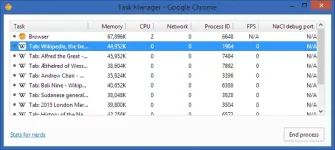
1. To open Chrome’s built-in task manager: Press Shift + Esc. Extremely useful when Chrome freezes.
2. To remove specific suggestion: Select the suggestion, then press Shift + Delete. Go and delete your how to shave my embarrassing searches now.
3. To drag multiple tabs to a new window: Press Ctrl + Click on tabs you want to move. Do the same to move multiple tabs to an existing window.
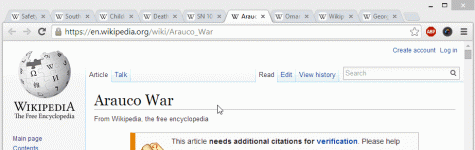
4. To scroll horizontally: Press Shift + Scroll.
Any Browsers
5. To access your address bar directly: Press F6 or Ctrl + L.
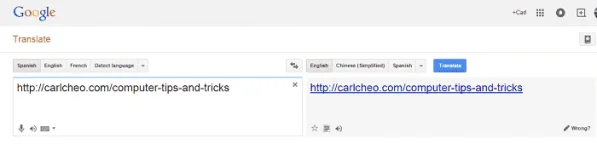
6. To access blocked web page: Go to You do not have permission to view the full content of this post. Log in or register now., paste the URL, select source language as other language, select destination language as the web page’s language, click Translate. Free web proxy.
7. To close a tab: Middle click on it.
8. To view articles with slideshows or multiple pages: Press Print or Ctrl + P.
9. To open all web pages of a bookmark folder: Middle click on the folder.
10. To reset to the default Window size of your web page after zooming: Press Ctrl + 0.
11. To highlight text in a web page: Click on the starting point, then press Shift + Click on the ending point. No more mouse dragging especially long text highlights.
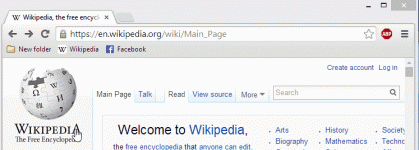
12. To fit more bookmarks: Remove all text. Only the favicon is visible now.
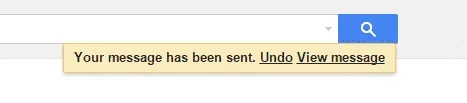
13. You can You do not have permission to view the full content of this post. Log in or register now.. Turn it on now just in case!
14. When researching products, type [product name] vs to compare with their rival products.
Windows
15. To open Task Manager directly with one hand: Press Ctrl + Shift + Esc. You’re welcome.
16. To minimize every open windows except yours: You do not have permission to view the full content of this post. Log in or register now. your active window. Do the same to maximize all windows. You sneaky Microsoft.
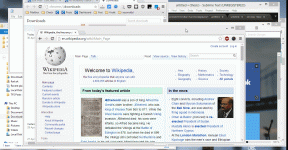
17. To freeze Task Manager: Hold Ctrl key. Useful for inspecting specific processes.
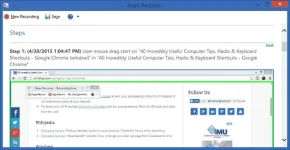
18. To capture the exact steps you take and document it nicely: Search psr to open You do not have permission to view the full content of this post. Log in or register now.. Try it now and you’ll be amazed.
19. To take a screenshot of the active window only: Press Alt + Print Screen. Bye Snipping Tool.
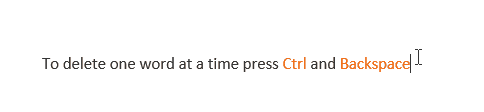
20. To delete one word at a time: Press Ctrl + Backspace.
21. To open applications on the taskbar: Press Windows key + Sequence number of the application. Do the same to minimize/maximize it.
22. To paste text without formatting: Press Ctrl + Shift + V.
23. To rename a file: Press F2. Works for multiple file too, which will append “(1), (2), etc.” at the end.
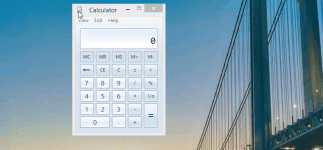
24. Open your Calculator and select View. Calculate your mortgage payment, fuel economy, vehicle lease payment, and more.
Wi-Fi
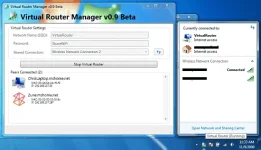
25. To boost your Wi-Fi signal: Download You do not have permission to view the full content of this post. Log in or register now. to turn your computer(s) into a Wi-Fi hotspot. It will extend the reach of your network.
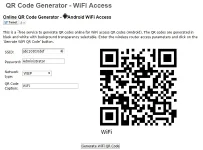
26. To share your Wi-Fi access: You do not have permission to view the full content of this post. Log in or register now. with the access details. Print the QR code and stick it on the wall.
Wikipedia
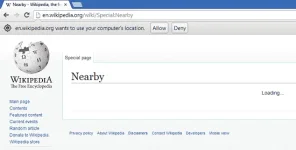
27. You do not have permission to view the full content of this post. Log in or register now.: Pulls up articles based on your location. Extremely handy when travelling.
28. You do not have permission to view the full content of this post. Log in or register now.: Read random articles. Now, change your start-up page from Facebook to this.
YouTube
29. To pause a video: Press K.
30. To skip 10 seconds back and forward: Press J and L respectively.
31. To search videos from a specific user only: Type @ before you search.
32. To save your time watching videos: Press > and < to speed up and slow down the video respectively.
33. To view all keyboard shortcuts: Press ?.
You do not have permission to view the full content of this post. Log in or register now.
Microsoft Office
34. To use mouse as laser pointer in PowerPoint: hold Ctrl + Left click. Mouse cursors are too mainstream. Stay cool with laser.
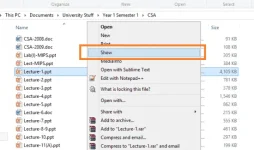
35. To open your PowerPoint file in presentation mode directly: Right click on the file, then select Show.
36. To shrink an Excel file size: save it as .xslb.
More…
You do not have permission to view the full content of this post. Log in or register now. have some little-known keyboard shortcuts that are really useful:
37. To fix out-of-sync audio: Press J and K to move the audio back and forward respectively.
38. To save your time watching videos: Press ] and [ to speed up and slow down the video respectively, by 0.1x. For example, you can save about 14 minutes if you watch a 2.5 hours movie 0.1x faster, without any noticeable difference.
...at just in case kelangan ko toh
CREDITS TO: You do not have permission to view the full content of this post. Log in or register now.
at sa mga me ICT na subject ngayun Google Chrome
1. To open Chrome’s built-in task manager: Press Shift + Esc. Extremely useful when Chrome freezes.
2. To remove specific suggestion: Select the suggestion, then press Shift + Delete. Go and delete your how to shave my embarrassing searches now.
3. To drag multiple tabs to a new window: Press Ctrl + Click on tabs you want to move. Do the same to move multiple tabs to an existing window.
4. To scroll horizontally: Press Shift + Scroll.
Any Browsers
5. To access your address bar directly: Press F6 or Ctrl + L.
6. To access blocked web page: Go to You do not have permission to view the full content of this post. Log in or register now., paste the URL, select source language as other language, select destination language as the web page’s language, click Translate. Free web proxy.
7. To close a tab: Middle click on it.
8. To view articles with slideshows or multiple pages: Press Print or Ctrl + P.
9. To open all web pages of a bookmark folder: Middle click on the folder.
10. To reset to the default Window size of your web page after zooming: Press Ctrl + 0.
11. To highlight text in a web page: Click on the starting point, then press Shift + Click on the ending point. No more mouse dragging especially long text highlights.
12. To fit more bookmarks: Remove all text. Only the favicon is visible now.
13. You can You do not have permission to view the full content of this post. Log in or register now.. Turn it on now just in case!
14. When researching products, type [product name] vs to compare with their rival products.
Windows
15. To open Task Manager directly with one hand: Press Ctrl + Shift + Esc. You’re welcome.
16. To minimize every open windows except yours: You do not have permission to view the full content of this post. Log in or register now. your active window. Do the same to maximize all windows. You sneaky Microsoft.
17. To freeze Task Manager: Hold Ctrl key. Useful for inspecting specific processes.
18. To capture the exact steps you take and document it nicely: Search psr to open You do not have permission to view the full content of this post. Log in or register now.. Try it now and you’ll be amazed.
19. To take a screenshot of the active window only: Press Alt + Print Screen. Bye Snipping Tool.
20. To delete one word at a time: Press Ctrl + Backspace.
21. To open applications on the taskbar: Press Windows key + Sequence number of the application. Do the same to minimize/maximize it.
22. To paste text without formatting: Press Ctrl + Shift + V.
23. To rename a file: Press F2. Works for multiple file too, which will append “(1), (2), etc.” at the end.
24. Open your Calculator and select View. Calculate your mortgage payment, fuel economy, vehicle lease payment, and more.
Wi-Fi
25. To boost your Wi-Fi signal: Download You do not have permission to view the full content of this post. Log in or register now. to turn your computer(s) into a Wi-Fi hotspot. It will extend the reach of your network.
26. To share your Wi-Fi access: You do not have permission to view the full content of this post. Log in or register now. with the access details. Print the QR code and stick it on the wall.
Wikipedia
27. You do not have permission to view the full content of this post. Log in or register now.: Pulls up articles based on your location. Extremely handy when travelling.
28. You do not have permission to view the full content of this post. Log in or register now.: Read random articles. Now, change your start-up page from Facebook to this.
YouTube
29. To pause a video: Press K.
30. To skip 10 seconds back and forward: Press J and L respectively.
31. To search videos from a specific user only: Type @ before you search.
32. To save your time watching videos: Press > and < to speed up and slow down the video respectively.
33. To view all keyboard shortcuts: Press ?.
You do not have permission to view the full content of this post. Log in or register now.
Microsoft Office
34. To use mouse as laser pointer in PowerPoint: hold Ctrl + Left click. Mouse cursors are too mainstream. Stay cool with laser.
35. To open your PowerPoint file in presentation mode directly: Right click on the file, then select Show.
36. To shrink an Excel file size: save it as .xslb.
More…
You do not have permission to view the full content of this post. Log in or register now. have some little-known keyboard shortcuts that are really useful:
37. To fix out-of-sync audio: Press J and K to move the audio back and forward respectively.
38. To save your time watching videos: Press ] and [ to speed up and slow down the video respectively, by 0.1x. For example, you can save about 14 minutes if you watch a 2.5 hours movie 0.1x faster, without any noticeable difference.
...at just in case kelangan ko toh
CREDITS TO: You do not have permission to view the full content of this post. Log in or register now.