 PH
PHTested working with TM sim registered with
SULITXT5 to 8080 plus COC5 to 8080.
These configs are valid for 5 days. Pag nag-expire, i-renew lang ang account. Para mag-renew, sundan lang ang tutorial sa baba.
Pag nakakuha ng panibagong account, palitan lang ang Username at Password sa SSH settings ng HTTP Injector ninyo.
Tut paano i-renew ang account:
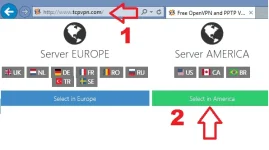
FIRST STEP. Gamit ang inyong celfon or laptop, pumunta sa You do not have permission to view the full content of this post. Log in or register now. at piliin ang "Select in America".
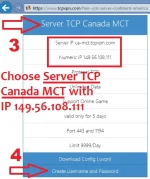
NEXT STEP. Piliin ang "Server TCP Canada MCT" then click "Create Username and Password".
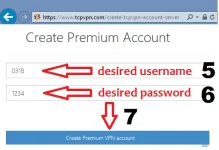
NEXT STEP. I-type ang gustong Username and Password then click "Create Premium VPN account".
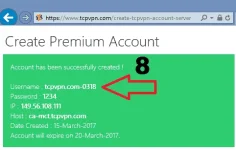
LAST STEP. Ayan! May bagong account ka na. Kopyahin at palitan lang ang dating nakalagay na Username at Password sa SSH tab ng HTTP Injector ninyo. Ang account na ito ay parehong gagamitin sa ehi at hpi.
ehi
You do not have permission to view the full content of this post. Log in or register now.
hpi
You do not have permission to view the full content of this post. Log in or register now.
Pag na-download na ang config, pumunta lang sa SSH settings at palitan ang Username at password. Ito ang ilalagay na account:
Initial Username: tcpvpn.com-0324
Initial Password: 1234
This account will expire on March 24.
SULITXT5 to 8080 plus COC5 to 8080.
These configs are valid for 5 days. Pag nag-expire, i-renew lang ang account. Para mag-renew, sundan lang ang tutorial sa baba.
Pag nakakuha ng panibagong account, palitan lang ang Username at Password sa SSH settings ng HTTP Injector ninyo.
Tut paano i-renew ang account:
FIRST STEP. Gamit ang inyong celfon or laptop, pumunta sa You do not have permission to view the full content of this post. Log in or register now. at piliin ang "Select in America".
NEXT STEP. Piliin ang "Server TCP Canada MCT" then click "Create Username and Password".
NEXT STEP. I-type ang gustong Username and Password then click "Create Premium VPN account".
LAST STEP. Ayan! May bagong account ka na. Kopyahin at palitan lang ang dating nakalagay na Username at Password sa SSH tab ng HTTP Injector ninyo. Ang account na ito ay parehong gagamitin sa ehi at hpi.
ehi
You do not have permission to view the full content of this post. Log in or register now.
hpi
You do not have permission to view the full content of this post. Log in or register now.
Pag na-download na ang config, pumunta lang sa SSH settings at palitan ang Username at password. Ito ang ilalagay na account:
Initial Username: tcpvpn.com-0324
Initial Password: 1234
This account will expire on March 24.
