PH
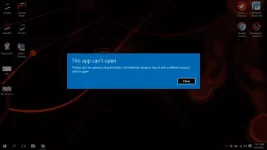
PHthis app cannot be activated by the built-in administrator windows 10
pano po ma alis yang error na yan sa windows 10? ngayon lang ako nka encounter ng ganyan error. halos lahat na try kona para maalis yang error na yan ayaw talga hehe.
patulong nga po salamat .. newbie lang ako sa windows 10 eh dpa masyado gamay .. salamat sa tutulong
pano po ma alis yang error na yan sa windows 10? ngayon lang ako nka encounter ng ganyan error. halos lahat na try kona para maalis yang error na yan ayaw talga hehe.
patulong nga po salamat .. newbie lang ako sa windows 10 eh dpa masyado gamay .. salamat sa tutulong