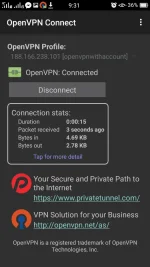
PH
PHStep by step tutorial on How to make your own Ovpn file with auto log in account
Globe default with promo
Globe MGC without promo or load
Things needed:
1.Patience
2. Download Openvpn connect You do not have permission to view the full content of this post. Log in or register now.
3.Text Editor You do not have permission to view the full content of this post. Log in or register now.
(Meron din sa playstore basta yan install nyo.)
Step 1: Go to tcpvpn.com to create your ssh account and to download the openvpn config need to be edit.
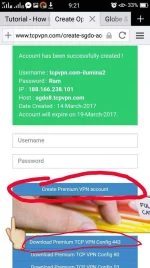
Step 2: Download the config file.(.rar files yung madodownload nyo)
Then go to Download folder then extract.
After maextract close nyo muna.
Step 3: Gamit yung pinadownload ko open nyo yun Text Editor.
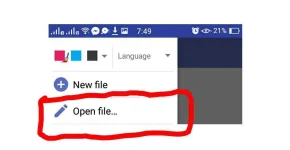
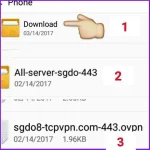
Step 4: We do Editing na ng config.
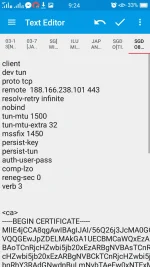
(Globe default with promo)
Bonus Remote Proxy
[Then choose nyo yun mataas ang up time at malakas speed [Https squid]
Bonus Proxy Server
(ito usually din yun payload)
Bonus Remote proxy
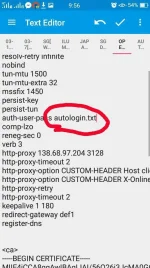
Step 5: Dito na natin ilalagay yun autologin account natin. Dun sa config na naedit add lang any file name basta .txt yung file.(autologin ang name na nilagay ko)
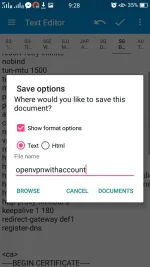
Step 6: Save your edited config.
See attachment then click documents.

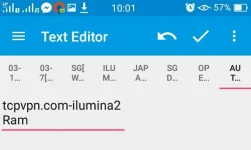
Step 7: Create new text document for auto log in . Yung ssh account na ginawa kanina copy paste mo lang yung username at password sa ganitong format (see picture)
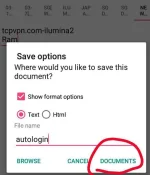
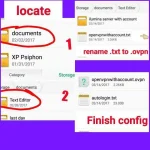
Step 8: Locate and rename the file.
And its ready to import na.
Kung may katanungan hanggat masasagot i will try to answer pag alam ko di ako magaling limitado lang din
Di ako programmer
Certified Bartender here
Hit Likes na lang kung nakatulong
Follow me
ilumina007
Globe default with promo
Globe MGC without promo or load
Things needed:
1.Patience
2. Download Openvpn connect You do not have permission to view the full content of this post. Log in or register now.
3.Text Editor You do not have permission to view the full content of this post. Log in or register now.
(Meron din sa playstore basta yan install nyo.)
Step 1: Go to tcpvpn.com to create your ssh account and to download the openvpn config need to be edit.
Step 2: Download the config file.(.rar files yung madodownload nyo)
Then go to Download folder then extract.
After maextract close nyo muna.
Step 3: Gamit yung pinadownload ko open nyo yun Text Editor.
- Note kung anong server kayo gumawa ng account yun din ang config na gagamitin ofcourse..
- Nagcreate ako sa sgdo8 kaya yun ang config
Step 4: We do Editing na ng config.
- Paste nyo ito dun after ng verb3
http-proxy [RemoteProxy] [Port]
http-proxy-retry
http-proxy-timeout 2
http-proxy-option CUSTOM-HEADER Host [proxy server]
http-proxy-option CUSTOM-HEADER X-Online-Host [proxy server]
http-proxy-retry
http-proxy-timeout 2
keepalive 1 180 [for Globe default]
Keepalive 10 30 [for Globe MGC]
redirect-gateway def1
register-dns
(Globe default with promo)
Bonus Remote Proxy
- Kayo na po bahala madami nagpost dito mga kaphc natin.
- Or go to You do not have permission to view the full content of this post. Log in or register now.
[Then choose nyo yun mataas ang up time at malakas speed [Https squid]
Bonus Proxy Server
(ito usually din yun payload)
- clients3.google.com
- M.google.com
- Or anything basta working google base proxy server.
- Madami din dito
Bonus Remote proxy
- 203.177.42.214 8080
- Clients3.google.com
- M.facebook.com
- M.globe.com.ph
- Dloadstation.com
- Madami din dito hanap lang
Step 5: Dito na natin ilalagay yun autologin account natin. Dun sa config na naedit add lang any file name basta .txt yung file.(autologin ang name na nilagay ko)
Step 6: Save your edited config.
See attachment then click documents.
Step 7: Create new text document for auto log in . Yung ssh account na ginawa kanina copy paste mo lang yung username at password sa ganitong format (see picture)
- (Note kung ano yung name ng nasa step 5 yung ang dapat name ng file nito kaya autologin dapat file name nito
- Then save as a .txt file
Step 8: Locate and rename the file.
And its ready to import na.
Kung may katanungan hanggat masasagot i will try to answer pag alam ko di ako magaling limitado lang din
Di ako programmer
Certified Bartender here
Hit Likes na lang kung nakatulong
Follow me
ilumina007
What you see here ,What you read here,When you Leave, leave it here.