 PH
PHXena Gabrielle
Eternal Poster
1. Right Click on your USB Drive in your Window Explorer and select Turn on BitLocker option.
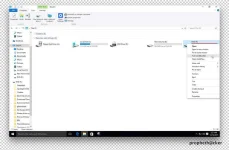
Open Properties of your Pendrive
2. In the next Window type the password for securing your Pendrive. Click on Next button.
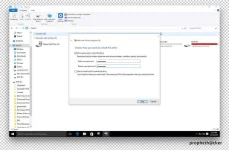
Window Bitlocker Drive Encryption
3. Now Backup your recovery key. Click on Save to file and save your recovery key in text format on your Computer.
Make sure you Save Recovery file in your computer. If you forget your Bitlocker password, you can recover it through this recovery file. You can also upload this file on any Cloud drive for extra backup.
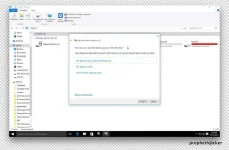
Window Bitlocker Save Recovery Key
4. Select Encrypt entire drive(slower but best for PCs and drivers already in use) and click on next button.
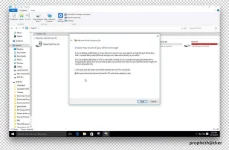
Encrypt Entire Drive for Bitlocker Encryption in Window
5. Are you ready to encrypt your Pendrive. Click on Start Encrypting button.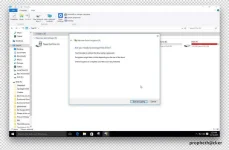
6. Now your Pendrive Encryption process started in your Window 10 PC. This process takes some time so sit back and read this post.
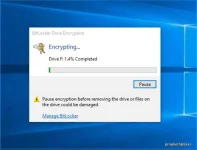
Bitlocker Encryption Process in Window PC
When Encryption completes in your Window PC. Plugged out your Pendrive and again Plug-in your Pendrive in your PC.
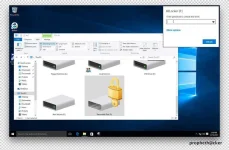
When you Open your Pendrive in Computer. Your Window 10 asks you enter the password for opening Pendrive like this screenshot.
Tested and effective sya sa PC ko. Try nyo nalang sa inyo
Open Properties of your Pendrive
2. In the next Window type the password for securing your Pendrive. Click on Next button.
Window Bitlocker Drive Encryption
3. Now Backup your recovery key. Click on Save to file and save your recovery key in text format on your Computer.
Make sure you Save Recovery file in your computer. If you forget your Bitlocker password, you can recover it through this recovery file. You can also upload this file on any Cloud drive for extra backup.
Window Bitlocker Save Recovery Key
4. Select Encrypt entire drive(slower but best for PCs and drivers already in use) and click on next button.
Encrypt Entire Drive for Bitlocker Encryption in Window
5. Are you ready to encrypt your Pendrive. Click on Start Encrypting button.
6. Now your Pendrive Encryption process started in your Window 10 PC. This process takes some time so sit back and read this post.
Bitlocker Encryption Process in Window PC
When Encryption completes in your Window PC. Plugged out your Pendrive and again Plug-in your Pendrive in your PC.
When you Open your Pendrive in Computer. Your Window 10 asks you enter the password for opening Pendrive like this screenshot.
Tested and effective sya sa PC ko. Try nyo nalang sa inyo
