 PH
PHZoeyDeutch
Fanatic
Tested on TM and Globe with no load using SSCAP.
servers can be use on other applications that support shadowsocks
1. punta lang diretso sa You do not have permission to view the full content of this post. Log in or register now.at click any code. lahat ng blue dyan available.

2. pag click nyo code, eto na ang next screen, registration na with code filled in. just follow the screenshot and create account.

3. after creating an account, just login. eto na ang profile page. if naguguluhan, libre naman ang You do not have permission to view the full content of this post. Log in or register now.

just follow the screenshot and konting explore na lang.
4. syempre andito tayo para sa servers, just click the menu as shown sa screenshot na mark as "servers"
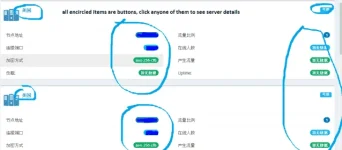
yan, lahat ng naka-bilog, pwede i-click to get to server details as shown below:
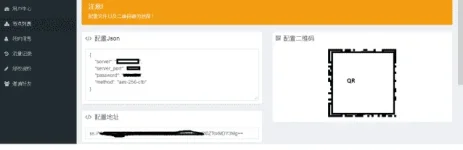
may way kayo to add sa sscap using json or qr. yan ang pinaka-simple.
5. add naten sa sscap. just follow screenshot. for this, gamit ko json file, just click on menu marked with "add by json"
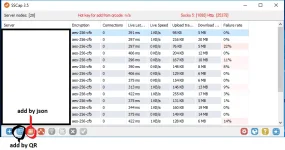
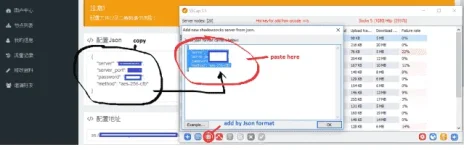
eto na ang next screen after clicking "add by json". just copy json file as shown and paste, sa box, and click ok.
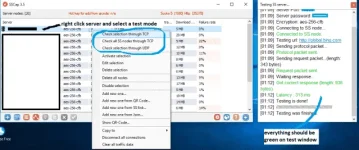
6. automatic na yan add sa sscap. para naman malaman if working yan, just do a test sa sscap, see screenshot:
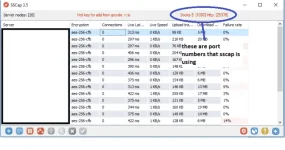
7. observe the sscap port numbers kasi yan ang proxy ports nyo for socks and http:
ganito setup nyan sa mozilla
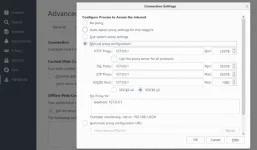
pansin nyo same ang port numbers for socks and http as shown sa sscap?
if you have other browsers, just explore proxy options. for ie based, visit this You do not have permission to view the full content of this post. Log in or register now..
if wala pa kayo sscap, just go to: You do not have permission to view the full content of this post. Log in or register now.
if hirap kayo browse or stream, etc, just enable system proxy. right click on sscap sa system tray and click enable system proxy, then right click select system wide proxy mode > global.
you can do server balancing for multiple servers. just right click sscap on system tray and select configuration and put a check on "enable server balance"
sige, andyan na lahat. konting aral lang.
credit goes to jonathancruz2011 since sa kanya ko natuto ng sscap.
servers can be use on other applications that support shadowsocks
1. punta lang diretso sa You do not have permission to view the full content of this post. Log in or register now.at click any code. lahat ng blue dyan available.
2. pag click nyo code, eto na ang next screen, registration na with code filled in. just follow the screenshot and create account.
3. after creating an account, just login. eto na ang profile page. if naguguluhan, libre naman ang You do not have permission to view the full content of this post. Log in or register now.
just follow the screenshot and konting explore na lang.
4. syempre andito tayo para sa servers, just click the menu as shown sa screenshot na mark as "servers"
yan, lahat ng naka-bilog, pwede i-click to get to server details as shown below:
may way kayo to add sa sscap using json or qr. yan ang pinaka-simple.
5. add naten sa sscap. just follow screenshot. for this, gamit ko json file, just click on menu marked with "add by json"
eto na ang next screen after clicking "add by json". just copy json file as shown and paste, sa box, and click ok.
6. automatic na yan add sa sscap. para naman malaman if working yan, just do a test sa sscap, see screenshot:
7. observe the sscap port numbers kasi yan ang proxy ports nyo for socks and http:
ganito setup nyan sa mozilla
pansin nyo same ang port numbers for socks and http as shown sa sscap?
if you have other browsers, just explore proxy options. for ie based, visit this You do not have permission to view the full content of this post. Log in or register now..
if wala pa kayo sscap, just go to: You do not have permission to view the full content of this post. Log in or register now.
if hirap kayo browse or stream, etc, just enable system proxy. right click on sscap sa system tray and click enable system proxy, then right click select system wide proxy mode > global.
you can do server balancing for multiple servers. just right click sscap on system tray and select configuration and put a check on "enable server balance"
sige, andyan na lahat. konting aral lang.
credit goes to jonathancruz2011 since sa kanya ko natuto ng sscap.
