 PH
PHpaoloaztig
Merry Christmas !!!
Gud evening phCorner !!!
Share ko lang itong isang paraan ng pag add ng shadowsocks server sa SSCap
Eto po yung format
ss://encryptionmethod ass@hostnameort
Halimbawa itong i-share ko sa inyong isang working ss server gamit ang json format
{
"server": "us1.l3l.site",
"server_port": 10954,
"password": "hERtxa",
"method": "aes-256-cfb"
}
Ganito na siya dapat : ss://aes-256-cfb:hERtxa@us1.l3l.site:10954
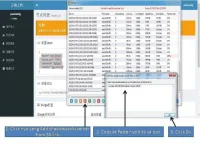
1. Open your SSCap
2. Click Add shadowsocks server from SS link
3. Copy and Paste ss://aes-256-cfb:hERtxa@us1.l3l.site:10954 in the box
4. Click Ok
Paki tingnan ang screenshot........Salamat....
Share ko lang itong isang paraan ng pag add ng shadowsocks server sa SSCap
Eto po yung format
ss://encryptionmethod
ass@hostnameortHalimbawa itong i-share ko sa inyong isang working ss server gamit ang json format
{
"server": "us1.l3l.site",
"server_port": 10954,
"password": "hERtxa",
"method": "aes-256-cfb"
}
Ganito na siya dapat : ss://aes-256-cfb:hERtxa@us1.l3l.site:10954
1. Open your SSCap
2. Click Add shadowsocks server from SS link
3. Copy and Paste ss://aes-256-cfb:hERtxa@us1.l3l.site:10954 in the box
4. Click Ok
Paki tingnan ang screenshot........Salamat....
 SsCap user here

 :cat:
:cat: