 PH
PHFreeNetNeed
Elite
Things you need:
Domdomsoft Manga Downloader preferably latest and last version build 5.5.22 with crack included
Domdomsoft Manga data files of Manga very important since it's going to be a pain in the ****. Doing manual encoding of manga you want to dl.
Good Internet connection of course.
Lets get Started:
1. Install Domdomsoft Manga ( Already have Domdomsoft Manga on pc skipped step 1.)
Run the ρá†ch and input the serial keys.
2. Go to directory of Domdomsoft and look for Data folder open it
common installation paths. 32 bit PC C:/Program Files/DomDomSoft Manga Downloader/Data
64bit PC C:/Program Files (x86)/DomDomSoft Manga Downloader/Data
if unsure were you installed the domdomsoft right clicked domdomsoft shortcut and open file location
3. Follow the pictures provided not mine credits goes to him for tricking/häçking domdomsoft to work again even domdomsoft is considered as dead program cudos.
in the data folder find the data file that you want to edit open with notepad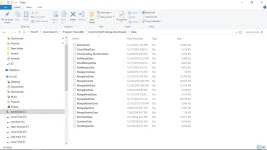
in the data folder find the data file that you want to edit open with notepad
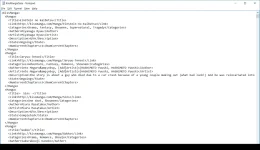
copy 1 from <manga> to </manga>
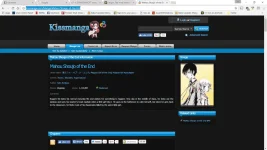
copy url
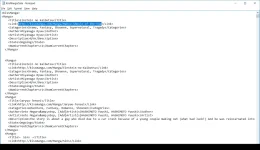 add to new copy then save this will add to domdomsoft manga and update chapters and description
Just rename:
<Manga Sites> eg. MangaHere, MangaGo, Webtoons etc. That are available on Domdomsoft Manga
EG. I'll use mangahere since i dont have the actual data file
<MangaHere>
<Manga>
<Title>Tower of God</Title>
<Link>You do not have permission to view the full content of this post. Log in or register now.</Link>
<Categories></Categories>
<Author></Author>
<Artist></Artist>
<Description></Description>
<State>Ongoing</State>
<NumCurrentChapters></NumCurrentChapters>
</Manga>
The script codes here
Under observation mangahere if the trick will for mangahere since I dont have the original data of mangahere, same goes with Hén†áí manga sites.
Proof Still Working
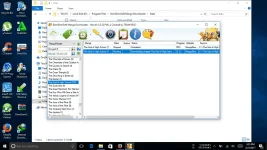
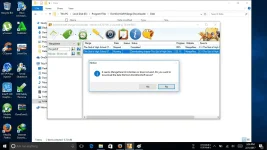
Domdomsoft is really dead
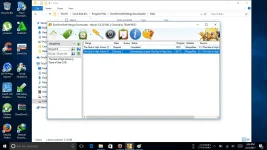
MangaHere missing manga files
Domdomsoft Manga Downloader preferably latest and last version build 5.5.22 with crack included
Domdomsoft Manga data files of Manga very important since it's going to be a pain in the ****. Doing manual encoding of manga you want to dl.
Good Internet connection of course.
Lets get Started:
1. Install Domdomsoft Manga ( Already have Domdomsoft Manga on pc skipped step 1.)
Run the ρá†ch and input the serial keys.
2. Go to directory of Domdomsoft and look for Data folder open it
common installation paths. 32 bit PC C:/Program Files/DomDomSoft Manga Downloader/Data
64bit PC C:/Program Files (x86)/DomDomSoft Manga Downloader/Data
if unsure were you installed the domdomsoft right clicked domdomsoft shortcut and open file location
3. Follow the pictures provided not mine credits goes to him for tricking/häçking domdomsoft to work again even domdomsoft is considered as dead program cudos.
in the data folder find the data file that you want to edit open with notepad
in the data folder find the data file that you want to edit open with notepad
copy 1 from <manga> to </manga>
copy url
add to new copy then save this will add to domdomsoft manga and update chapters and descriptionJust rename:
<Manga Sites> eg. MangaHere, MangaGo, Webtoons etc. That are available on Domdomsoft Manga
EG. I'll use mangahere since i dont have the actual data file
<MangaHere>
<Manga>
<Title>Tower of God</Title>
<Link>You do not have permission to view the full content of this post. Log in or register now.</Link>
<Categories></Categories>
<Author></Author>
<Artist></Artist>
<Description></Description>
<State>Ongoing</State>
<NumCurrentChapters></NumCurrentChapters>
</Manga>
The script codes here
Code:
<Manga Sites>
  <Manga>
    <Title></Title>
    <Link></Link>
    <Categories></Categories>
    <Author>Siu</Author>
    <Artist>Siu</Artist>
    <Description></Description>
    <State>Ongoing</State>
    <NumCurrentChapters></NumCurrentChapters>
  </Manga>
</Manga Sites>
Under observation mangahere if the trick will for mangahere since I dont have the original data of mangahere, same goes with Hén†áí manga sites.
Proof Still Working
Domdomsoft is really dead
MangaHere missing manga files