 PH
PHdeejay0814
Enthusiast
Fix-any-Mediatek-Smartphone-using-SP-Flash-Tool.jpg
If you are an Android geek & love to play with custom ROMs, recoveries & Kernels, one day you'll encounter a hard bricked device.
Now what does hard brick mean?
kung di mo kaya iBOOT UP ang device mo, di kayang pumasok sa recovery mode or see boot logo this would actually leave your device in a state where it is not more than a brick.
SP Flash tool ay isang application sa Windows & linux kung san you could find very useful in fixing extreme cases of a bricked MTK Android.
SP Flash Tool o mas kilala as Smartphone Flash Tool nagproprovide ito ng madaming options kagaya ng flashing custom or stock recoveries or Kernel (boot.img). As Mediatek Smartphone at wala kang Official tool for any such problems, SP Flash tool is really a boon for Mediatek Smartphone users. To learn more about this tiny yet effective tool, refer our guide: You do not have permission to view the full content of this post. Log in or register now.. Now, para di masayang ang oras, lets get started with unbricking your Smartphone.
Requirements:
- A PC with Windows or Linux OS.
- USB Cord
- Manually install You do not have permission to view the full content of this post. Log in or register now. on the PC
- Your bricked Android device.
- Original/Working Stock ROM (Do a proper research as flashing the wrong ROM would permanently brick your device)
- You do not have permission to view the full content of this post. Log in or register now.
Install VCOM Drivers:
- Open mo ang Device manager sa My computer. Click on any item & Go to Actions > Add legacy hardware.
- tapos, Press next & select Install drivers manually.
- Press next ulit & click on Have disk.
- Sa browse option, select mo ang VCOM drivers as per your OS.
- Once its done. may makikita kang screen similar to this:
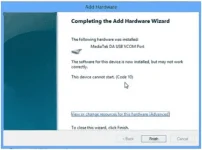
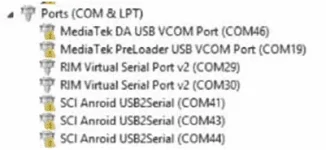
Once you are done sa Installation part, go to device manager & you'll find a device parang ganto:
How to Flash ROM using SP Flash Tool:
1. Tanggalin mo ang battery sa phone and tas balik mo ulit ang battery without booting the phone (kung inbuilt ang battery ng phone simply switch it off). Also siguraduhin na walang SD card sa phone (kung may SD card slot)
2. tapos Launch SP Flash Tool as Administrator
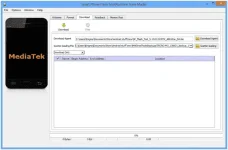
SP Flash Tool
3. Click on Scatter-loading option & browse to the scatter file of your Stock ROM. (You can find the scatter file with the original stock rom zip file)
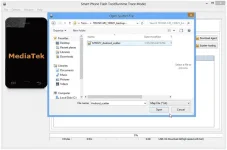
SP Flash Tool Scatter file selection
This will load few names on your screen with a selected box.
4. Now, kung gusto mo iformat ang phone, Click Format at the top.
5. Once you are done with everything, click mo download button sa top ng window
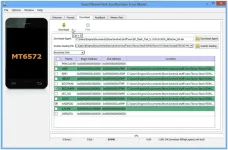
Start flashing
6. Stop should now be prominent while other options should be grayed out
7. tapos Connect mo ang switched off phone (with battery inside) sa PC via USB cord
8. A progress bar should start running
9. Disconnect mo ang phone, tanggalin ang battery for 15 seconds (kung removable ang battery), tapos balik mo ulit sa battery then power up the phone.
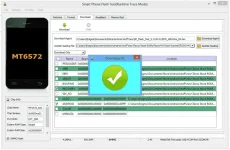
Final words
As the procedure medyo complex to sa mga newbies. However, I have tried to make it as simple as possible. Don't worry! if you are stuck at any point, you can contact us from the below comment form.
