👨‍🏫 Tutorial Buying a used SSD? Three checks before you pay

  • Thread starter Thread starter erenkoray
  • Start date Start date

erenkoray

Leecher
phcorner-used-ssd-checklist.webp

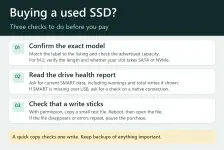
1. Get the exact model number. Compare it with the listing and check the capacity in Windows. For M.2 drives, check your PC’s manual for the supported length and whether the slot takes SATA or NVMe.

2. Ask for a current SMART screenshot for that drive. Look for warnings and check total writes and power-on hours if the tool shows them. Use the manufacturer’s tool if it supports the model. Some USB enclosures hide SMART data, so ask for a direct SATA or M.2 check if the numbers are missing.

3. With the seller’s permission, copy a small test file and open it after a reboot. If the file vanishes or you keep getting write errors, hold off. A quick copy only tests a small part of the drive, so keep backups even if it passes.

What do you usually ask to see before buying a used SSD?
 
nung nag hahanap ako sa marketplace usually talaga Brand name then Kung may dram and mataas TBW
 
Good point. For a used SSD, I’d ask for both numbers: the rated TBW for that exact model and capacity, and the actual total host writes from the drive’s SMART report. For example, a drive rated for 600 TBW might already have 80 TB written. I’d check the SMART warnings too, since the two numbers only tell you part of the story.
 

About this Thread

  • 2
    Replies
  • 9
    Views
  • 2
    Participants
Last reply from:
erenkoray

Online now

Members online
1,117
Guests online
16,496
Total visitors
17,613

Forum statistics

Threads
2,365,349
Posts
29,430,157
Members
1,047,205
Latest member
enmaaaa
Back
Top