 PH
PremiumCourses
Eternal Poster
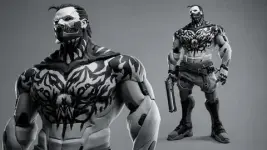
Stylised Character Sculpting in Blender
Published 11/2026
Created by Nexttut Education Pvt.Ltd.
MP4 | Video: h264, 1920x1080 | Audio: AAC, 44.1 KHz, 2 Ch
Level: Intermediate | Genre: eLearning | Language: English | Duration: 86 Lectures ( 32h 9m ) | Size: 47.6 GB
Confidently create a Complete Stylised Character in Blender-from concept analysis and blockout to high-poly sculpting.
What you'll learn
 Create stylised pants, straps, buckles, bags, armor, and detailed accessories with clean modeling techniques. Design and model a complete stylised weapon from blockout to final detailing. Paint textures, assign materials, create cinematic lighting setups, and render beautiful portfolio images in Blender and Marmoset Toolbag. Pose the character
Requirements
 You should be familiar with Blender's interface, navigation, and basic modeling tools.
Description
Do you want to create professional-quality stylised characters for games and portfolio projects? Welcome to Nexttut's Stylised Character Creation in Blender.About Your Instructor
My name is Mahdi Khouei, and I have been a 3D character artist for a decade now. I have worked in VFX and the game industry, as well as 3D printing. Currently, I'm working as a freelance 3D character artist.
By the End Of This Course, You Will Be Able To
Confidently create a Complete Stylised Character in Blender-from concept analysis and blockout to high-poly sculpting, clothing, accessories, weapon creation, and final presentation.
You'll also learn production-ready workflows for retopology, rigging, posing, texturing, lighting, and rendering to create professional-quality portfolio pieces.
What You Will Learn
 Build accurate body proportions and establish strong primary forms from the concept. Refine anatomy, armor, clothing, facial features, hands, shoes, and hair using a professional sculpting workflow. Create stylised pants, straps, buckles, bags, armor, and detailed accessories with clean modeling techniques. Design and model a complete stylised weapon from blockout to final detailing. Optimize the sculpt using Quad Remesher and prepare clean meshes for production. Prepare the character for animation, refine weight painting, pose the character, and fix deformation issues. Paint textures, assign materials, create cinematic lighting setups, and render beautiful portfolio images in Blender and Marmoset Toolbag.
Who Is This Course For?
Intermediate Blender artists who want to create complete stylised characters. Character artists building a professional portfolio. Game artists looking to understand a full production-ready character workflow. Blender users who want to improve sculpting, modeling, rigging, and rendering skills.Who Is This Course NOT For?
Complete beginners with no prior experience using Blender or basic 3D software. Artists looking exclusively for photorealistic character creation techniques.What Are The Requirements Or Prerequisites For Taking This Course?
You should be familiar with Blender's interface, navigation, and basic modeling tools.
Software Required
Blender Marmoset Toolbag (recommended for final presentation)Basic sculpting experience is helpful but not mandatory, as each stage is demonstrated in detail.
Join Us Now!
Ready to bring your stylised characters to life? Join this course and learn a complete production-ready workflow-from concept to final render. Start creating professional-quality characters for your portfolio today.
Who this course is for
 Intermediate Blender artists who want to create complete stylised characters.
Homepage
Code:
https://www.udemy.com/course/stylised-character-sculpting-in-blenderLinks are Interchangeable - No Password - Single ExtractionRapidgator
You do not have permission to view the full content of this post. Log in or register now.