 PH
agentbayabas04
Established
Xing API — $1,000 in Free API Credits (Cline Extension Setup)
==============================================================
- Sign-Up Link: You do not have permission to view the full content of this post. Log in or register now.
(This link is a must to get your free credits)
- Supported Models: gpt-6-astra, gpt-6.1-sol
Part 1: How to Claim Your Credits & Get Your API Key
----------------------------------------------------
1. Register a new account through the invitation link above.
2. Open Telegram and start the bot (search for @xingchi66bot).
3. Tap the first button in the chat to receive your promo code.
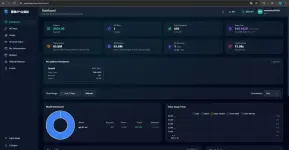
4. Go back to the Xing API website (You do not have permission to view the full content of this post. Log in or register now.) and redeem the code to add the balance to your account.
5. Create an API key through the Xingchiapi website, copy it, and save it.
Part 2: Set Up Xing API in VS Code (Cline Extension)
----------------------------------------------------
Requirements:
- VS Code installed
- Cline Extension installed in VS Code (cline.bot)
Step-by-Step Configuration:
1. Open VS Code, go to the Extensions tab (Ctrl+Shift+X), search for "Cline" (cline.bot), and click Install.
2. Click the Cline icon on your VS Code left sidebar.
3. Click the Gear icon (Settings) in the top-right corner of the Cline panel.
4. Under "API Configuration", fill in the following details:
- API Provider: OpenAI Compatible
- Base URL: You do not have permission to view the full content of this post. Log in or register now.
- OpenAI Compatible API Key: (Paste the API key you created on the Xingchiapi website)
- Model ID: gpt-6.1-sol (or gpt-6-astra)
5. (Optional) Set Reasoning Effort to "High" for better coding depth.
6. Click the "Done" button in the top-right corner to save. You are now ready to use Cline!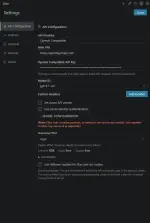

==============================================================
- Sign-Up Link: You do not have permission to view the full content of this post. Log in or register now.
(This link is a must to get your free credits)
- Supported Models: gpt-6-astra, gpt-6.1-sol
Part 1: How to Claim Your Credits & Get Your API Key
----------------------------------------------------
1. Register a new account through the invitation link above.
2. Open Telegram and start the bot (search for @xingchi66bot).
3. Tap the first button in the chat to receive your promo code.
4. Go back to the Xing API website (You do not have permission to view the full content of this post. Log in or register now.) and redeem the code to add the balance to your account.
5. Create an API key through the Xingchiapi website, copy it, and save it.
Part 2: Set Up Xing API in VS Code (Cline Extension)
----------------------------------------------------
Requirements:
- VS Code installed
- Cline Extension installed in VS Code (cline.bot)
Step-by-Step Configuration:
1. Open VS Code, go to the Extensions tab (Ctrl+Shift+X), search for "Cline" (cline.bot), and click Install.
2. Click the Cline icon on your VS Code left sidebar.
3. Click the Gear icon (Settings) in the top-right corner of the Cline panel.
4. Under "API Configuration", fill in the following details:
- API Provider: OpenAI Compatible
- Base URL: You do not have permission to view the full content of this post. Log in or register now.
- OpenAI Compatible API Key: (Paste the API key you created on the Xingchiapi website)
- Model ID: gpt-6.1-sol (or gpt-6-astra)
5. (Optional) Set Reasoning Effort to "High" for better coding depth.
6. Click the "Done" button in the top-right corner to save. You are now ready to use Cline!