 PH
PHAwesome GameDev Agent Skills: Game Dev Skills para sa AI Coding Agent Mo
Quick share lang, paps: kung gumagamit ka ng AI coding agent sa game dev, eto yung collection ng 77 game-dev skills plus isang router na kusang pumipili ng tamang skill para sa engine at task mo. Free at open source. Setup in 4 steps
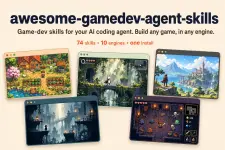
 Project banner · Image: Awesome GameDev Agent Skills, from the project README
Yung "skills" dito ay mga SKILL.md files, parang specialized na instructions na binabasa lang ng AI agent mo pag kailangan. Imbes na manghula yung agent kung paano gumawa ng double jump sa Godot o inventory sa Unity, may naka-ready na siyang guide na naka-pin sa specific na engine version.
Kailangan mo muna
- AI coding agent na sumusuporta sa SKILL.md format, like Claude Code, Cursor, Codex, GitHub Copilot, Gemini CLI, Kiro, Windsurf, o Cline. Free yung skills, pero may sariling plan yung agent mismo at may bayad yung iba, kaya check sa official site nila.
- Node.js 22.20 pataas, kung gagamitin mo yung npx install. Di na kailangan kung via Claude Code plugin o manual copy.
- Yung game engine mo. Naka-pin yung skills sa specific versions (Godot 4.7, Unity 6.3 LTS, Unreal Engine 5.8, etc.), kaya kung mas luma yung version mo, i-double check yung code na lalabas.
- Konting terminal skills.
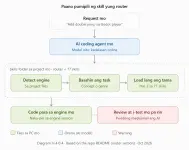
 Paano pumipili ng skill yung router · Diagram made for this thread, based on the "How the router picks skills" section ng README
Setup
- Sa project folder ng game mo, i-preview muna yung laman bago mag-install:
Code:npx skills add <owner/repo sa link sa baba> --list - I-install. Kusa nitong dine-detect yung agent mo. Dagdag ka ng -g kung gusto mo sa lahat ng projects, o -a para pumili ng agent (hal. -a cursor):
Code:npx skills add <owner/repo sa link sa baba> - Claude Code user? Pwede rin via plugin. Kung isang engine lang gamit mo, router at yung engine bundle lang ang i-install:
Palitan yung godot ng unity, unreal, ebitengine, web-engines, o other-engines kung yun ang gamit mo.Code:claude plugin marketplace add <owner/repo sa link sa baba> claude plugin install router@awesome-gamedev-agent-skills claude plugin install godot@awesome-gamedev-agent-skills - Tapos kausapin mo lang yung agent mo in plain English, hal. "add a double jump to my Godot player." Di mo na kailangan i-type yung skill names, yung router na bahala.
Pwede mong gawin dito
- Player movement, double jump, physics, at camera para sa engine mo
- Inventory, quests, dialogue, at save slots para sa RPG
- Procedural dungeons para sa roguelike, pati NPC at enemy AI
- HUD at menus na gumagana sa iba't ibang screen size at controller
- Game feel o "juice": screen shake, hit-stop, easing
- Art direction para consistent yung sprites, tiles, at UI art
- Game jam planning, mabilis na prototype, at pag-publish sa itch.io o Steam
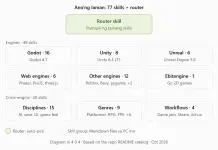 Ano ang laman ng 77 skills · Diagram made for this thread, based on the Catalog section ng README
Take note
- License: Apache-2.0, free at open source. Basahin din yung NOTICE file para sa attribution at trademark notes.
- Instructions sila para sa agent mo. Kaya ng karamihan sa agents mag-edit ng files at mag-run ng commands, kaya basahin muna yung SKILL.md files (o i-run yung --list) bago i-install.
- Privacy: local files lang yung skills, pero online yung AI model ng karamihan sa agents. Yung code at request mo, napupunta sa AI provider ng agent mo. Wag isama ang API keys, passwords, o secrets sa prompts.
- Telemetry: based sa README ng skills CLI, nagko-collect siya ng anonymous usage data. Pwede i-off gamit
DISABLE_TELEMETRY=1. - Hindi magic: pwedeng mali pa rin yung code ng AI. I-review at i-test palagi.
- Community project siya. Hindi official na gawa ng Godot, Unity, Epic, 𝚁𝚘𝚋𝚕𝚘𝚡, o ng mga AI companies.
Notes at disclaimer
Hindi ako yung maintainer at hindi ako affiliated sa project na 'to o sa kahit anong engine o AI company na nabanggit. Galing sa GitHub README at release notes nila yung info dito (checked October 31, 2026). Bago pa lang 'to (first release June 2026) at isang maintainer lang ang naka-list, kaya mabilis pang nagbabago yung bilang ng skills at engine versions. Yung mga claim tungkol sa quality at compatibility, galing sa dev mismo; sabi ng v1.0.0 release notes, na-verify sa Claude Code at Kiro, at documented lang para sa iba. Sa official repo lang kumuha, at i-test muna sa spare o test project bago sa main project mo. Di ko pa personally na-try. Follow niyo yung Apache-2.0 license, and use at your own risk.
 Official links
You do not have permission to view the full content of this post. Log in or register now.
 Tip swap
Ikaw, paano mo ginagamit yung AI agent sa game dev? Share mo yung setup mo at isang tip o prompt na gumana sa'yo:
Code:
Agent:
Engine at version:
Skill o prompt na gumana:
Tip o issue:
Wag isama yung API keys o project secrets sa reply. Best tips from the replies get added to the main post, with your name.
 Credits & References
- Developer: Abhishek Barali (AbhishekBarali on GitHub), creator at maintainer, under the gamedev-skills org
- Source: Project GitHub README at release notes (v1.0.0 at v1.1.0), checked October 31, 2026
- License: Apache-2.0, with a NOTICE file for attribution at trademarks
- Image: Project banner: Awesome GameDev Agent Skills, from the project README
- Diagrams: Made for this thread, based sa README (router section at Catalog)
- Built on: Agent Skills (SKILL.md) open standard · skills CLI by Vercel Labs