 PH
PH-
Welcome to PHCorner Forums! Sign up for free to unlock full access and exclusive privileges, including:
- Asking questions about computer and mobile issues
- Discovering internet tips for your mobile network and computer
You are using an out of date browser. It may not display this or other websites correctly.
You should upgrade or use an alternative browser.
You should upgrade or use an alternative browser.
Error: Windows cannot be installed
- Thread starter minervaa
- Start date
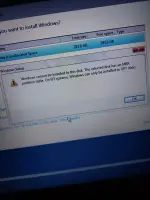
nakukuha ko yung error kapag nagttry ako mag create ng new disk boss ehunallocated kasi yung drive, kung di ako nagkakamali need mo create new disk tapos select mo yang unallocated tapos format mo saka mo pwede iinstall
When you've booted from the USB and see your disks; Delete all partitions on the disk, select the unallocated space, and install to that. Don't format.nakukuha ko yung error kapag nagttry ako mag create ng new disk boss eh
EDIT 2023-10-28: TL;DR: In addition to the above, disconnect all additional disks.
In addition to the above, you should disconnect any additional disks. You should only have one disk connected, which is the one you will install Windows to.
The reason for this is not only so that you don't install to the wrong disk and lose data; but also because, if you have more than one disk connected, Windows may place the bootloader on any disk that it chooses. You then are reliant on two disks to boot into Windows, which is not ideal and is not expected.
Furthermore, if you have an existing operating system install on another disk, and you are making a new install to a new disk, Windows setup is likely to search out the existing bootloader and write over it, making the existing install un-bootable.
About this Thread
-
3Replies
-
32Views
-
2Participants
Last reply from:
Dashflix
Dashflix
New Topics
-
Win 10 RTM Professional Volume:MAK (Activation Count: 191)
- Started by serega
- Replies: 0
- 💽 Operating Systems
-
Error: Windows cannot be installed
- Started by minervaa
- Replies: 3
- 💽 Operating Systems
-
Win 10 RTM Enterprise Volume:MAK (Activation Count: 220)
- Started by serega
- Replies: 0
- 💽 Operating Systems
-
Win 10 RTM Enterprise Volume:MAK (Activation Count: 203)
- Started by serega
- Replies: 0
- 💽 Operating Systems
-
Win 10 RTM Enterprise Volume:MAK (Activation Count: 226)
- Started by serega
- Replies: 1
- 💽 Operating Systems
-
2 keys Office19_RTM19_ProPlus2019MSDNR_Retail (Error Code: 0xC004C008)
- Started by serega
- Replies: 0
- 💽 Operating Systems
-
Win 10 RTM ProfessionalN Retail (Error Code: 0xC004C008)
- Started by serega
- Replies: 0
- 💽 Operating Systems
-
Office 2013_ProjectProR_Retail (Error Code: 0xC004C008)
- Started by serega
- Replies: 0
- 💽 Operating Systems
-
2 keys Office 2013_ProPlusMSDNR_Retail (Error Code: 0xC004C008)
- Started by serega
- Replies: 0
- 💽 Operating Systems
-
9 keys Office21_ProPlus2021MSDNR_Retail (ErrorCode: 0xC004C008)
- Started by serega
- Replies: 0
- 💽 Operating Systems
Trending Topics
-
-
-
-
Microsoft Office Pro Plus 2021-2024 v2609 Build 20430.20118 (x64) Incl. Ac†ïvâ†ør
- Carlos2026
Replies: 2 -
-
-
Mga lods check here!!! GHOST SPECTRE WIN10 22H2 PRO / HOME Release to Update 42
- PHC- Naksu
Replies: 6
Online now
- Members online
- 1,235
- Guests online
- 6,481
- Total visitors
- 7,716