PH
PH"Pingtool 4.01 Free" download sa Google Play Store.
Sakal net sa #WIFI#*/*Data*#.
Router WiFi w/© sim slot: Use "Globe/TM"....
#Edit APN.#*
APN: You do not have permission to view the full content of this post. Log in or register now.
Then find set sa DNS [√] or edit sa.... DNS.
.... then apply....
(Any)-Pocket WIFI. #3GH+#
#Edit APN.#*
APN: You do not have permission to view the full content of this post. Log in or register now.
....SAVE....
Back to home screen Open App.
"Pingtool 4.01"
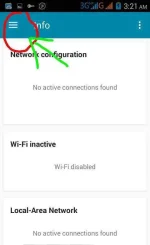
OZ sa MGC.... *#TCP#*....
Set: 108.67.222.222/203.177.42.214
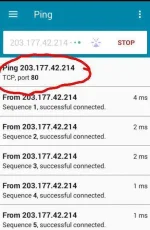
....PING....
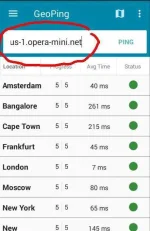
Or Click: GeoPing.
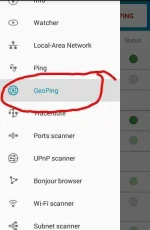
Type sa text box sample "server4-1.operamini.com/global-4-lvs-colossus-1.operamini.net".
Then Click: Ping....
Sa screenshot, may pag-pipilian na location choose "Bangalore" or any.
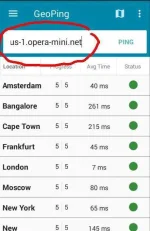
Choose any....
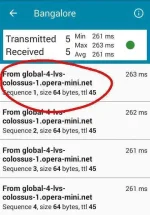
Click: 3 dots....
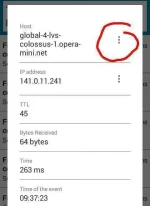
Click: Ping....
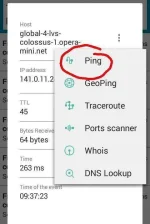
Click: Stop the current task?, OK....
Click: "Ping" see sa screenshot below....
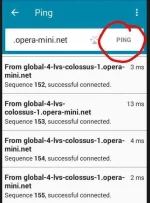
Try dn sa mode settings....
Click 3dots right sa taas, set settings.
Choose: try any mode to connected.
TCP
HTTPS
HTTP
next....
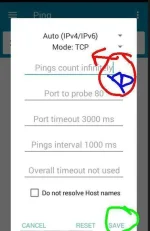
At the 1st line, "click" and click back or back to erase, nasa keypad.
Lilitaw na lng to>>>>. " Pings count infinetely" kasunod ng "Port to probe 80"....
....Then SAVE....
Then Click to "PING" again.
Try dn po, kung interasado lng, depende? lng sa version ng phone.
MGC.... [off data roaming]....
Sakal net sa #WIFI#*/*Data*#.
Router WiFi w/© sim slot: Use "Globe/TM"....
#Edit APN.#*
APN: You do not have permission to view the full content of this post. Log in or register now.
Then find set sa DNS [√] or edit sa.... DNS.
.... then apply....
(Any)-Pocket WIFI. #3GH+#
#Edit APN.#*
APN: You do not have permission to view the full content of this post. Log in or register now.
....SAVE....
Back to home screen Open App.
"Pingtool 4.01"
OZ sa MGC.... *#TCP#*....
Set: 108.67.222.222/203.177.42.214
....PING....
Or Click: GeoPing.
Type sa text box sample "server4-1.operamini.com/global-4-lvs-colossus-1.operamini.net".
Then Click: Ping....
Sa screenshot, may pag-pipilian na location choose "Bangalore" or any.
Choose any....
Click: 3 dots....
Click: Ping....
Click: Stop the current task?, OK....
Click: "Ping" see sa screenshot below....
Try dn sa mode settings....
Click 3dots right sa taas, set settings.
Choose: try any mode to connected.
TCP
HTTPS
HTTP
next....
At the 1st line, "click" and click back or back to erase, nasa keypad.
Lilitaw na lng to>>>>. " Pings count infinetely" kasunod ng "Port to probe 80"....
....Then SAVE....
Then Click to "PING" again.
Try dn po, kung interasado lng, depende? lng sa version ng phone.
MGC.... [off data roaming]....