 PH
PHHi Mga ka PHC,
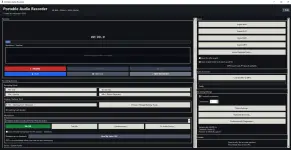
Gumawa lang ko ng basic audio recorder pang laptop/windows device.
Free - if anyone is interested, just comment, para i upload ko.
in case gusto mo lang magrecord ng audio from your pc, and light weight app.
Hindi ko pa na compile as exe, pero click mo lang yun. bat file
🎙 Record mic, system audio, or both
🎚 Keep mic and source as separate tracks
 Record vocals over WAV, MP3, MIDI or KAR backing tracks
🖱 Drag waveforms to manually sync vocals and music
⏱ Auto Sync + millisecond timing correction
🎛 Noise reduction, compressor, EQ, echo/reverb and normalization
 Record one source while monitoring through another device
 Independent music/source volume control
 Waveforms, dB meters, clipping warnings and input-health monitoring
 Automatic device reconnect and audio-device repair tools
🛡 Crash-safe recording recovery
 Optional live vocal monitoring
 WAV, MP3, FLAC, AIFF and separate-track export
Built-in WAV → MP3 converter
 MID / MIDI / KAR + SoundFont / FluidSynth support
 Custom themes and responsive interface
 Custom keyboard shortcuts
 Searchable built-in help
 100% local recording, no account required
One recorder for vocals, karaoke, system audio, backing tracks and clean separate-track recording.
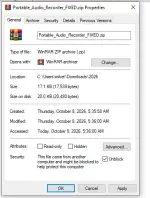
before extracting, right click and unblock since hindi sya microsoft detected dahil personal use lang naman to
Gumawa lang ko ng basic audio recorder pang laptop/windows device.
Free - if anyone is interested, just comment, para i upload ko.
in case gusto mo lang magrecord ng audio from your pc, and light weight app.
Hindi ko pa na compile as exe, pero click mo lang yun. bat file
- Mic + system audio recording
Record your microphone and computer audio at the same time. - Separate-track recording
Save mic and system/backing audio as separate tracks. No stem separation needed later. - Backing Track mode
Load a song or backing track directly into the app and record vocals separately. Pwede link from youtub. - Recording Sync correction
Fix vocal delay with manual millisecond adjustment, Auto Sync, and preview before saving. - Mic enhancements
Noise reduction, voice profiles, EQ, compression, echo/reverb, and custom presets. - System audio / loopback capture
Capture what your PC is playing without relying only on the microphone. - Live source testing
Test mic and device inputs with live dB meters before recording. - Playback device selection
Record from one source while listening through another device, such as Bluetooth headphones. - WAV / MP3 / FLAC / AIFF export
Plus separate-track export. - Built-in WAV → MP3 converter
No separate converter app needed. - Custom EQ + presets
10-band EQ with saved presets. - Keyboard shortcuts
Space for Play/Pause, X for Stop, with customizable shortcuts. - Performance modes
Stable, Balanced, and Low Latency profiles for different PCs and recording needs. - Themes
Dark/light presets plus custom colors. - Portable and local
Recordings stay on the PC. No account required.
🎙 Record mic, system audio, or both
🎚 Keep mic and source as separate tracks
Record vocals over WAV, MP3, MIDI or KAR backing tracks🖱 Drag waveforms to manually sync vocals and music
⏱ Auto Sync + millisecond timing correction
🎛 Noise reduction, compressor, EQ, echo/reverb and normalization
Record one source while monitoring through another device Independent music/source volume control Waveforms, dB meters, clipping warnings and input-health monitoring Automatic device reconnect and audio-device repair tools🛡 Crash-safe recording recovery
Optional live vocal monitoring WAV, MP3, FLAC, AIFF and separate-track export Built-in WAV → MP3 converter MID / MIDI / KAR + SoundFont / FluidSynth support Custom themes and responsive interface Custom keyboard shortcuts Searchable built-in help 100% local recording, no account requiredOne recorder for vocals, karaoke, system audio, backing tracks and clean separate-track recording.
before extracting, right click and unblock since hindi sya microsoft detected dahil personal use lang naman to