 PH
PH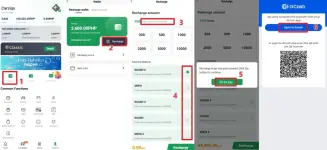
You do not have permission to view the full content of this post. Log in or register now.
How ito na po step by step Carziqo
- Tap Wallet
- Tap Top Up
- Enter the amount
- Select the corresponding payment method; for mobile banking, select QRPH
- Tap Go to Payment
- You will be redirected to the payment app to make the payment. For mobile banking, you need to take a screenshot of the payment QR code and save it to your phone’s photo album. Then open your mobile banking app, find the QR code payment interface, upload the QR code photo, and complete the payment.