 PH
PHHello everyone! 
I’m sharing this quick guide for anyone who wants to try PDF2Go Education Premium for free.
PDF2Go is a useful online PDF toolkit that lets you convert, edit, compress, repair, protect, and manage PDF files directly from your browser. With Premium access, you also get higher limits and additional features that can be especially useful when working with large files or multiple documents.
The process involves creating a temporary EDU email first, then using that email to register for a PDF2Go Education account. I’ve written the steps below as simply as possible so they’re easy to follow.
With PDF2Go Premium, you get access to several additional features and higher usage limits, including:
Congratulations! If the registration and verification are successful, you should now have access to the PDF2Go Education subscription.
You can now enjoy the Premium tools and higher limits available with your Education account.

Hope this guide helps!
If PDF2Go does not accept the email or the registration page gives you an error, it may sometimes be caused by the current browser session, cookies, or cached data.
You can try the following:
I’m sharing this quick guide for anyone who wants to try PDF2Go Education Premium for free.
PDF2Go is a useful online PDF toolkit that lets you convert, edit, compress, repair, protect, and manage PDF files directly from your browser. With Premium access, you also get higher limits and additional features that can be especially useful when working with large files or multiple documents.
The process involves creating a temporary EDU email first, then using that email to register for a PDF2Go Education account. I’ve written the steps below as simply as possible so they’re easy to follow.
 Why PDF2Go Premium Is Worth Having
With PDF2Go Premium, you get access to several additional features and higher usage limits, including: Over 20 PDF tools for converting, editing, compressing, repairing, and protecting PDF files
 Large document support — files up to 8 GB
 Batch processing — process up to 400 files per conversion
 Unlimited OCR (Optical Character Recognition) for extracting text from scanned documents and images
 256-bit SSL encrypted data transfer
 Import files directly from a URL, Google Drive, or Dropbox
 No advertisements while using the website
 A two-week money-back guarantee for regular ρáíd subscriptions
 Create a Temporary EDU Email
- Go to You do not have permission to view the full content of this post. Log in or register now.
- Watch the ad and close it afterward, if one appears.
- Sign in using your Gmail account.
This helps ensure that the temporary EDU email you create will remain accessible under your account instead of being publicly shared. - Enter a custom email name of your choice.
- From the available domains, select: @hathitrannhien.edu.vn
- Click Create.
- Your temporary EDU email inbox will then open.
Create Your PDF2Go Education Account
- Go to: You do not have permission to view the full content of this post. Log in or register now.
- Enter the temporary EDU email you created earlier.
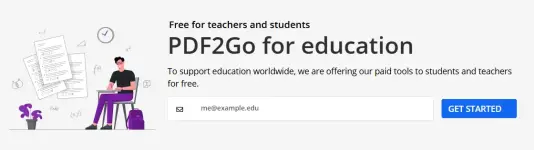
- Click Get Started.
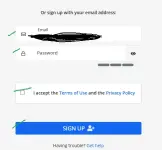
- Create a password for your PDF2Go account.
- Check the agreement box, then click Sign Up.
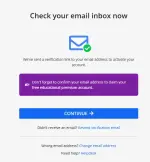
- PDF2Go will display an email verification message.
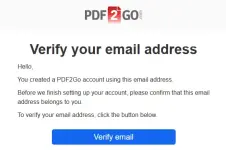
- Go back to your temporary EDU email inbox and look for the verification email from PDF2Go.
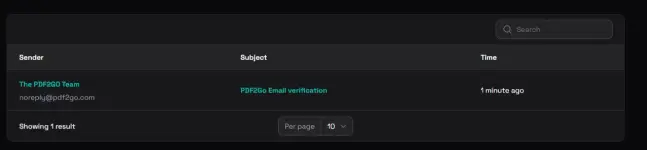
- Open the email and click the Verify Email button.
- After successfully verifying your email, you should see the message: “Premium education access unlocked!”
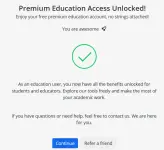
- Click Continue.
 Done!
Done!
Congratulations! If the registration and verification are successful, you should now have access to the PDF2Go Education subscription.You can now enjoy the Premium tools and higher limits available with your Education account.
Hope this guide helps!
 If You Encounter an Error
If PDF2Go does not accept the email or the registration page gives you an error, it may sometimes be caused by the current browser session, cookies, or cached data.You can try the following:
- Open the PDF2Go Education page using Incognito or Private Browsing mode.
- Try using a different browser.
- Close the previous registration page completely before trying again.
- If the email itself is rejected as ineligible, use an email address that meets PDF2Go’s current Education requirements rather than repeatedly attempting to bypass the eligibility check.