 PH
PHSa mga wala png nakaka-alam sa Add to home screen app share ko to. 
Download "Google Chrome" sa Google play store.
Open app Google chrome.
Type sa text box sample "phcorner.org" then search.
See screen shot below.
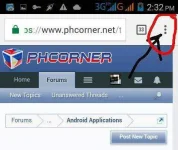
Click 3 dots right side sa taas.
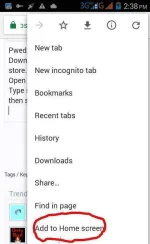
Choose add to home screen.
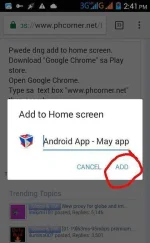
Click Add.
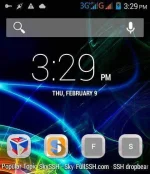
Go to home screen.
Yan OK na. meron ka ng app.
See sa screen shot.
Good luck.
Download "Google Chrome" sa Google play store.
Open app Google chrome.
Type sa text box sample "phcorner.org" then search.
See screen shot below.
Click 3 dots right side sa taas.
Choose add to home screen.
Click Add.
Go to home screen.
Yan OK na. meron ka ng app.
See sa screen shot.
Good luck.